
Testing vs Debugging: Understanding the Difference
Clarifying two distinct but complementary processes

Welcome back to NextGen QA! In our previous articles, we’ve explored what software testing is and the seven principles that guide effective testing. Today, we’re tackling a common source of confusion for newcomers: the difference between testing and debugging.
Many people use these terms interchangeably, but they’re actually distinct activities that require different skills, mindsets, and approaches. Understanding this difference is crucial for your growth as a tester — and for communicating effectively with your development team.
Let’s clear up the confusion once and for all.
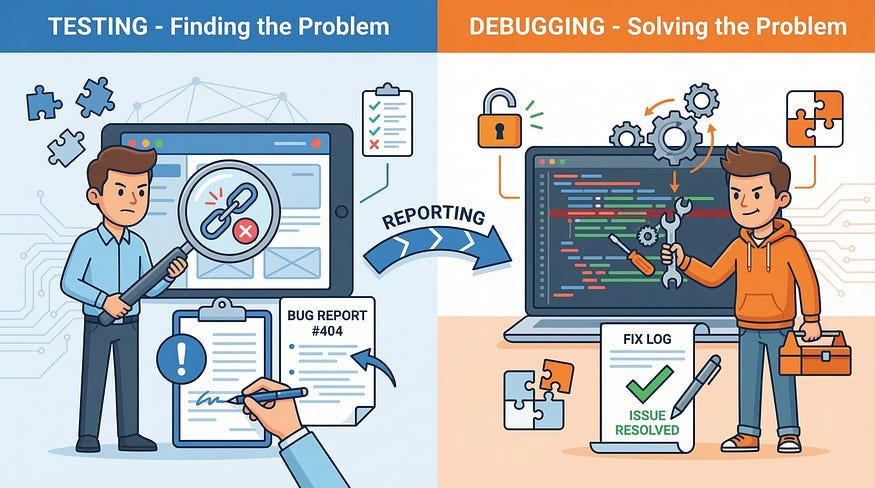
The Core Distinction
Let’s start with clear definitions:
Testing is the process of executing a system with the intent of finding defects. It’s about discovering what’s wrong.
Debugging is the process of identifying the root cause of a defect and fixing it. It’s about solving what’s wrong.
Think of it this way:
Testing asks: “Is there a problem?”
Debugging asks: “Why is there a problem, and how do I fix it?”
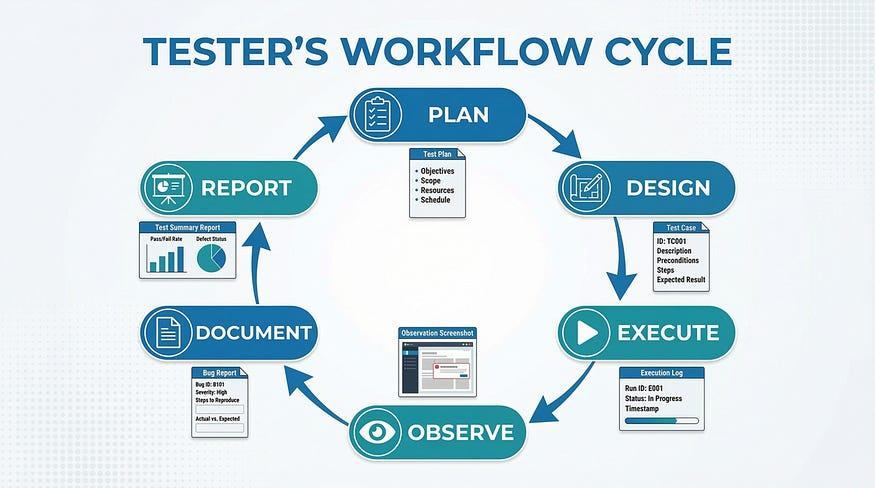
Testing: The Discovery Process
What Testing Involves
Testing is a verification and validation activity performed primarily by testers (though developers also test their own work). The goal is to evaluate whether software meets requirements and to expose defects.
Key testing activities include:
Planning: Deciding what to test, how to test it, and what resources you need
Designing Test Cases: Creating specific scenarios that will verify software behavior
Executing Tests: Running the application through planned test cases or exploring it systematically
Observing Results: Watching what actually happens compared to what should happen
Documenting Findings: Recording defects, test results, and observations
Reporting: Communicating findings to stakeholders and development teams
The Testing Mindset
Testers approach software with a critical eye. They’re looking for problems, thinking about edge cases, and asking “what if?” questions:
What if the user enters special characters?
What if two people click submit at the same time?
What if the network connection drops mid-transaction?
What if someone uses an old browser?
Testing requires:
Skepticism: Assume things might not work as expected
Creativity: Think of unusual scenarios
Attention to detail: Notice subtle problems
Communication skills: Clearly describe what went wrong
Objectivity: Report what you find without bias
Testing Outcomes
When testing is complete, you have:
A list of defects found (or confidence that none were found in tested areas)
Test execution reports
Coverage metrics
Risk assessments
Evidence that testing was performed
Testing doesn’t fix anything — it finds problems and provides information.
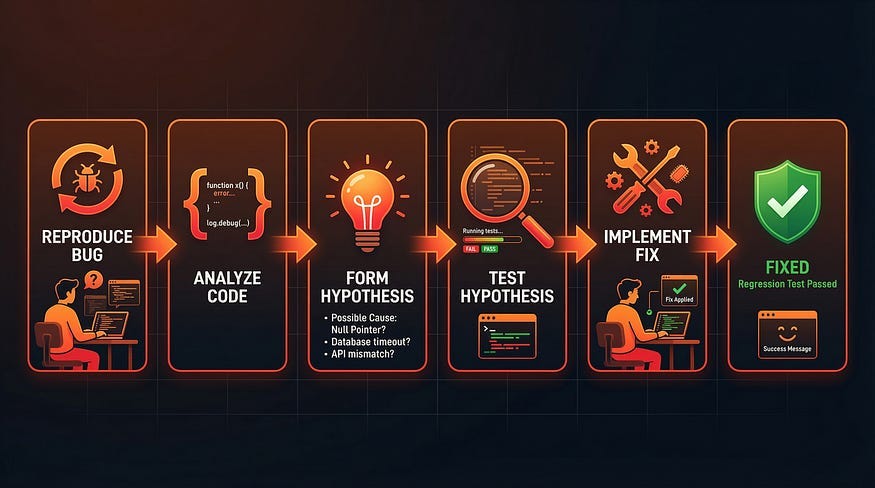
Debugging: The Problem-Solving Process
What Debugging Involves
Debugging is a development activity performed primarily by developers, though testers often participate in debugging to assist developers by providing additional investigation and analysis. The goal is to locate the root cause of a defect and fix it.
Testers can contribute to debugging by:
Reproducing the defect consistently under various conditions
Isolating which specific conditions trigger the bug
Gathering detailed logs, screenshots, and system state information
Testing different scenarios to narrow down the root cause
Identifying patterns across multiple related defects
While developers ultimately implement the code fix, testers who develop debugging skills become valuable collaborators in the problem-solving process.
Key debugging activities include:
Reproducing the Defect: Consistently recreating the problem to understand it
Analyzing Code: Examining the source code where the problem might exist
Isolating the Cause: Using tools and techniques to pinpoint exactly what’s causing the issue
Hypothesizing: Forming theories about why the defect occurs
Testing Hypotheses: Checking if your theory about the cause is correct
Implementing a Fix: Modifying the code to eliminate the defect
Verifying the Fix: Ensuring the fix works and doesn’t create new problems
The Debugging Mindset
Developers approach debugging like detectives solving a mystery. They need to:
Understand the codebase architecture
Trace execution flow
Examine variable states
Think logically about cause and effect
Consider system interactions
Debugging requires:
Analytical thinking: Breaking down complex problems
Technical knowledge: Understanding code, architecture, and systems
Patience: Some bugs take hours or days to find
Systematic approach: Methodically eliminating possibilities
Code comprehension: Reading and understanding others’ code
Debugging Tools and Techniques
Developers use specialized tools:
Debuggers: Step through code line by line
Breakpoints: Pause execution at specific points
Watch variables: Monitor how data changes
Stack traces: See the sequence of function calls leading to an error
Log analysis: Examine system logs for clues
Profilers: Analyze performance and resource usage
Debugging Outcomes
When debugging is complete, you have:
Root cause identified
Code fix implemented
Understanding of why the defect occurred
Potentially, insights into preventing similar defects
Debugging doesn’t find new problems — it solves known problems.
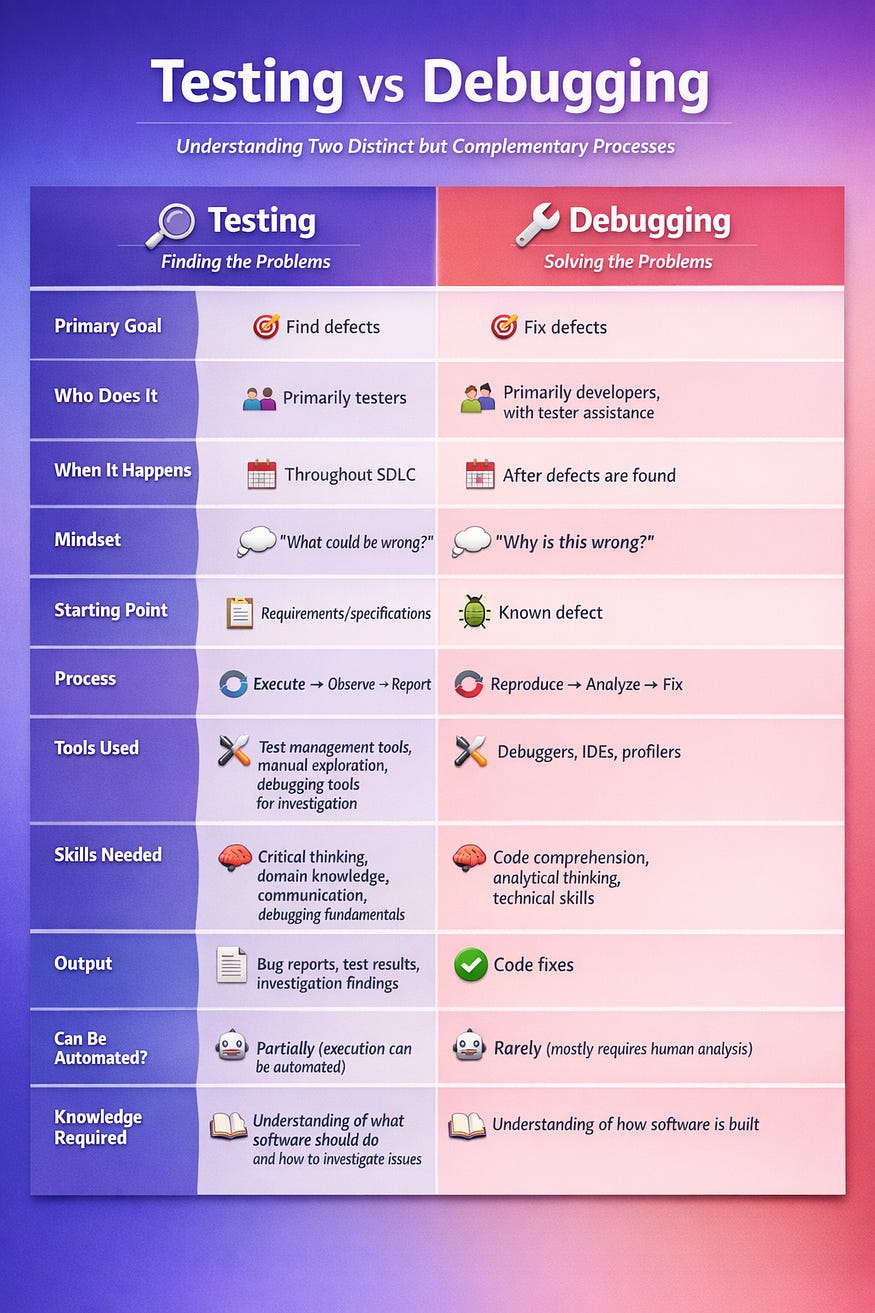
Side-by-Side Comparison
Let’s see these processes side by side:
How They Work Together
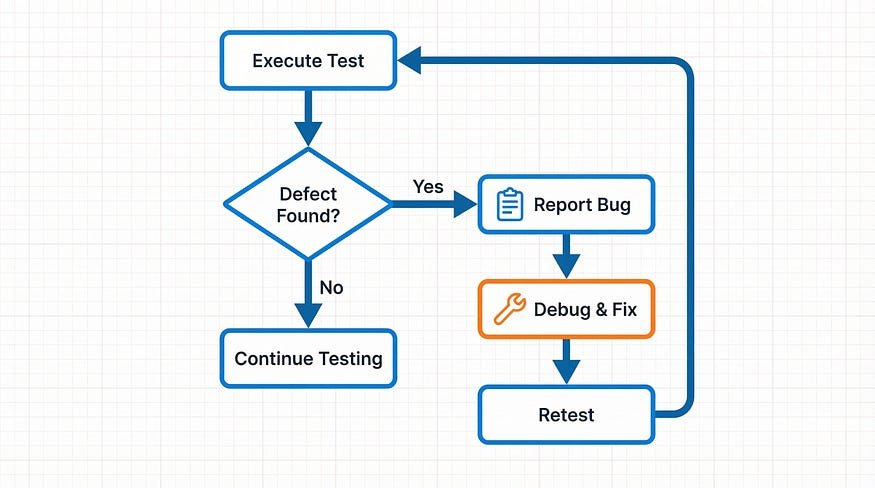
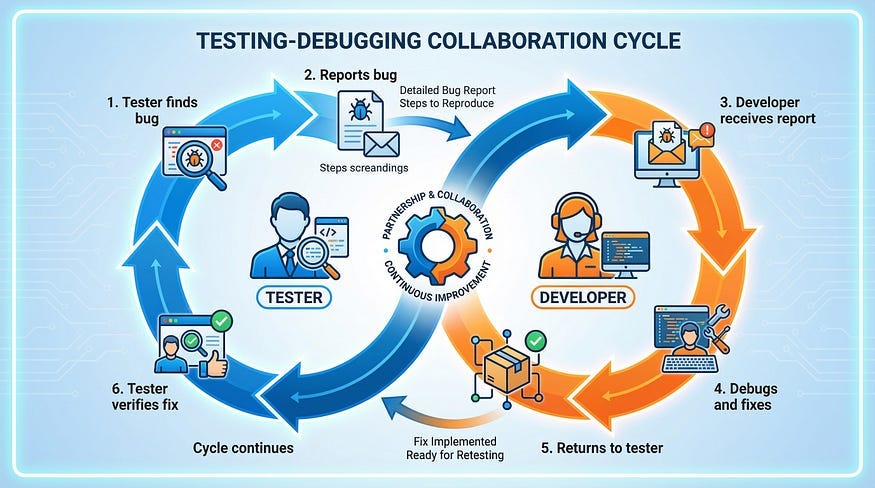
While testing and debugging are different, they’re complementary processes that work together in a cycle:
Tester executes a test and discovers that actual results don’t match expected results
Tester documents the defect with clear steps to reproduce, expected vs. actual results, and supporting evidence
Developer receives the bug report and attempts to reproduce the issue
Developer debugs by analyzing code, finding the root cause, and implementing a fix
Developer signals the fix is ready and marks the bug as resolved
Tester retests the specific defect to verify it’s fixed
Tester performs regression testing to ensure the fix didn’t break anything else
The cycle continues throughout development.
A Real-World Example
Let’s see these processes in action with a concrete example.
The Scenario
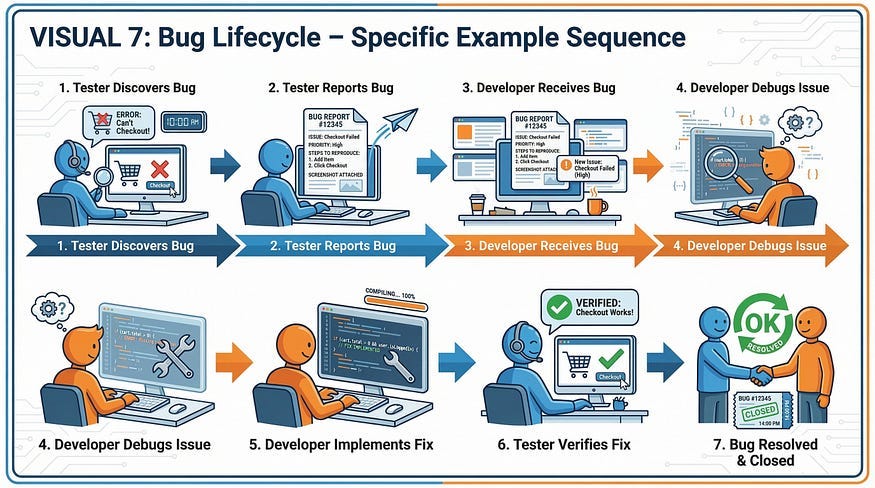
You’re testing a shopping cart feature on an e-commerce website.
Testing Phase
What the tester does:
Executes test: Add item to cart, update quantity to “0”, click Update
Observes result: The item remains in cart with quantity “0” instead of being removed
Compares to expected result: According to requirements, items with quantity 0 should be removed from cart
Documents the defect:
Title: “Item not removed when quantity set to 0”
Steps to reproduce: Detailed steps
Expected result: Item should be removed
Actual result: Item stays with quantity 0
Environment: Browser, OS, test data used
Screenshot: Image showing the problem
5. Reports bug to development team
Testing is complete for this defect. The tester has done their job: finding and clearly documenting the problem.
Debugging Phase
What the developer does:
Reproduces the bug following the tester’s steps — confirms it happens
Examines the code for the cart update functionality
Finds the relevant code section:
if (quantity > 0) {
     updateCartItem(itemId, quantity);
   }
4. Identifies the problem: The code only handles quantity > 0, but doesn’t handle the quantity = 0 case
5. Implements the fix:
if (quantity > 0) {
     updateCartItem(itemId, quantity);
   } else if (quantity == 0) {
     removeCartItem(itemId);
   }
6. Tests the fix locally to verify it works
7. Marks bug as resolved and notifies the tester
Back to Testing
The tester then:
Retests the specific fix: Verifies that setting quantity to 0 now removes the item
Performs regression testing: Tests related cart functionality to ensure nothing broke
Closes the bug if everything works correctly, or reopens it if problems remain
Common Misconceptions
Let’s address some confusion around these activities:
Misconception 1: “Testers Don’t Need to Know How to Debug”
Reality: This is false. Both developers AND testers benefit greatly from debugging skills. While testers typically don’t fix the code, understanding debugging makes them significantly more effective at their jobs.
Why testers should learn debugging:
Better bug reports: When you can identify the root cause area, you save developers hours of investigation
Faster resolution: Providing stack traces, error logs, and specific code locations speeds up fixes
Deeper investigation: You can isolate exactly which conditions trigger bugs, not just that bugs exist
More credibility: Developers respect testers who understand technical details
Clearer communication: Speaking the same technical language improves collaboration
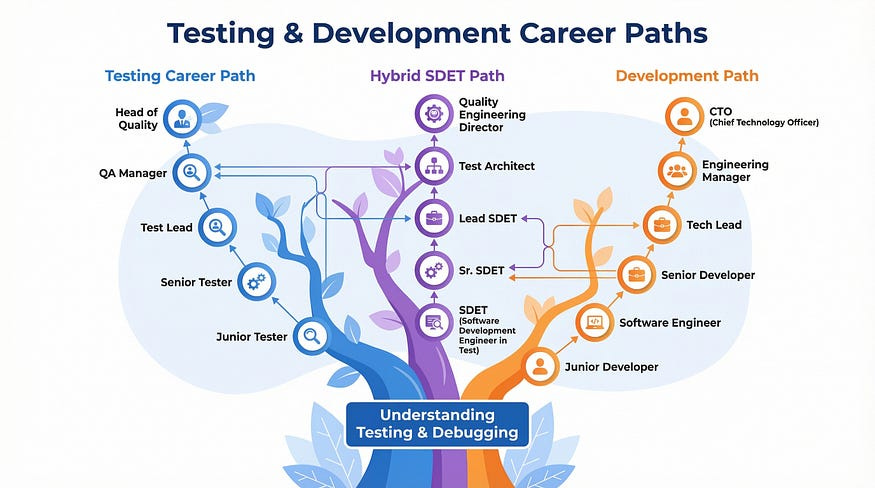
Career growth: Debugging skills open doors to senior testing roles and SDET positions
What testers can debug:
Examine browser console errors and stack traces
Use debugging tools to inspect network requests
Analyze application logs to find error patterns
Reproduce bugs with specific data that triggers the issue
Narrow down which component or module is failing
You don’t need to write the fix, but understanding HOW to investigate makes you invaluable to your team. The best testers are those who can hand a developer a bug report that says: “Here’s the exact scenario, here’s the error in the console, here’s the API call that’s failing, and it seems to be related to the authentication module.”
That’s debugging in action — and it makes everyone’s job easier.
Misconception 2: “Developers Don’t Test, They Only Debug”
Reality: Developers absolutely should test their own code before handing it to testers. They perform unit testing, integration testing, and sometimes, even create automated tests. The difference is scope and perspective — developers test their own work, while testers provide independent verification.
Misconception 3: “If Testing Was Done Right, Debugging Wouldn’t Be Needed”
Reality: No amount of testing can prevent all defects from being introduced during development. Testing finds defects; debugging fixes them. Both are necessary. Remember Principle 1 from our last article: Testing shows the presence of defects, not their absence.
Misconception 4: “Debugging is Just Testing in Reverse”
Reality: The skills and mindsets are quite different. Testing requires creative thinking about how users might interact with software. Debugging requires technical analytical skills to trace through code and system behavior.
Why This Distinction Matters
Understanding the difference between testing and debugging is important for several reasons:
1. Career Path Clarity
Knowing the difference helps you understand career options:
Do you enjoy finding problems or solving them?
Do you prefer working with the application as a whole or diving into code?
Are you more interested in user perspective or technical implementation?
Your answer might guide you toward testing roles, development roles, or hybrid roles like software development engineer in test (SDET).
2. Better Communication
When you understand these are separate activities, you communicate more effectively:
You don’t tell developers “I’ll debug this” — you say “I’ll investigate and provide more details”
You don’t say “Testing is complete” when you mean “I found and fixed a bug”
You clearly separate “bug found” from “bug fixed” in your reports
3. Clearer Responsibilities
Teams work better when roles are clear:
Testers focus on comprehensive coverage and finding defects
Developers focus on fixing defects efficiently
Neither role is “better” — both are essential
4. Process Improvement
Understanding the distinction helps improve processes:
You can measure testing and debugging separately
You can optimize each process independently
You can identify bottlenecks (are bugs being found but not fixed? Are fixes being made but not verified?)
The Role of Automation and AI
Both testing and debugging can be supported by automation and AI, but in different ways. Understanding these capabilities — and their limitations — is crucial for modern testers.
Test Automation
Automates the execution of test cases
Helps run tests faster and more frequently
Still requires humans to design tests and interpret results
Common tools: Selenium, Cypress, Playwright (we’ll cover these in future articles)
Debugging Automation
Provides tools to help analyze code and system behavior
Can automate some diagnostic tasks
Still requires human analysis to understand root causes
Common tools: Debuggers, profilers, static analysis tools
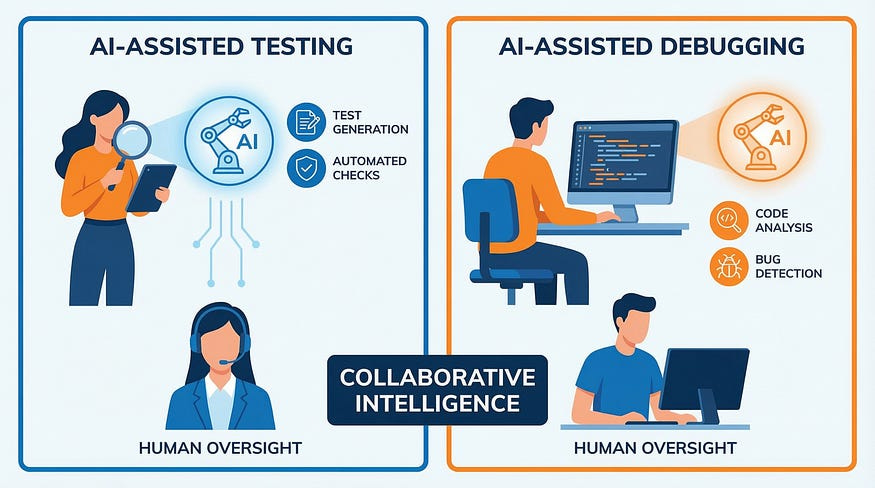
How AI Helps Testing
AI is transforming testing in powerful ways:
Test Case Generation:
AI can analyze requirements and suggest test scenarios you might not have considered
Generates test data that covers edge cases
Creates variations of existing test cases to improve coverage
Pattern Recognition:
Identifies areas of the application with high defect probability based on code complexity
Recognizes similar bugs across different modules
Detects visual regressions by comparing screenshots
Test Maintenance:
Self-healing tests that adapt when UI elements change
Automatically updates selectors when elements are renamed
Reduces the maintenance burden of large test suites
Analysis and Reporting:
Analyzes test results to identify patterns in failures
Suggests which tests to run based on code changes
Provides insights into test coverage gaps
Example: You’re testing a checkout flow. AI analyzes your existing 50 test cases and suggests: “You haven’t tested what happens when a user applies a coupon code after entering payment information” or “Consider testing with special characters in the address field — your current tests only use standard addresses.”
How AI Helps Debugging
AI is also becoming a valuable debugging assistant:
Root Cause Analysis:
Analyzes stack traces and error logs to suggest likely causes
Identifies similar bugs that occurred in the past and their solutions
Traces through complex execution paths to find where things went wrong
Code Analysis:
Scans code for common bug patterns
Suggests potential fixes based on the error type
Identifies security vulnerabilities before they reach production
Intelligent Search:
Searches codebases for similar issues
Finds relevant Stack Overflow discussions
Locates documentation for error messages
Example: A developer encounters a null pointer exception. AI examines the stack trace, searches the codebase, and suggests: “This error pattern appeared 3 months ago in the UserProfile module. The fix involved adding a null check before accessing the address field. The same pattern might apply here.”
The Problems with AI in Testing
While AI offers impressive capabilities, it’s not a silver bullet. Here are the critical limitations testers must understand:
1. AI Lacks Context Understanding
The Problem: AI doesn’t understand your business domain, user expectations, or why certain things matter more than others.
Example: AI might generate 100 test cases for a social media “Like” button with the same rigor it applies to a bank transfer feature. It doesn’t know that one is critical and one is low-risk.
What This Means: You must provide context, prioritize AI suggestions, and apply your domain knowledge to determine what’s actually important.
2. AI Misses Creative Edge Cases
The Problem: AI generates tests based on patterns it has learned, but it can’t think creatively about unusual scenarios a human tester might imagine.
Example: A human tester might think: “What if someone’s name is just one letter?” or “What if a user tries to book a hotel room for 100 years in the future?” AI typically won’t generate these creative “what if?” scenarios unless they exist in its training data.
What This Means: Exploratory testing by humans remains irreplaceable for finding unexpected issues.
3. AI Generates False Positives
The Problem: AI tools can flag issues that aren’t actually problems, wasting time investigating non-issues.
Example: An AI visual testing tool might flag a button as “changed” because it’s rendered 2 pixels differently due to browser rendering variations — not because there’s an actual defect.
What This Means: You need expertise to distinguish real issues from noise, which requires understanding the principles we’ve been discussing.
4. AI Can Create Brittle Tests
The Problem: AI-generated tests might be tightly coupled to implementation details, breaking frequently when the application evolves normally.
Example: AI generates a test that relies on specific CSS class names or internal IDs that change with every deployment, causing tests to fail constantly even though functionality works fine.
What This Means: Human oversight is needed to create maintainable, robust test automation.
5. AI Doesn’t Understand “Good Enough”
The Problem: AI doesn’t understand risk tolerance or when to stop testing. It will keep generating tests indefinitely if you let it.
Example: For a simple contact form, AI might generate 500 test cases covering every possible validation scenario. But you know that 20 well-designed test cases would provide sufficient coverage for this low-risk feature.
What This Means: You must apply Principle 2 (Exhaustive Testing is Impossible) and make strategic decisions about where to invest testing effort.
6. Over-Reliance Degrades Skills
The Problem: If you always use AI to generate test cases without understanding why they’re designed that way, you never develop your own test design skills.
Example: A tester uses AI to generate all their test cases for a year. When AI suggests testing a payment field with “negative numbers,” they don’t question it because they never learned about equivalence partitioning and don’t realize negative payment amounts might be valid for refunds.
What This Means: Learn the fundamentals first. Use AI to amplify your expertise, not replace it.
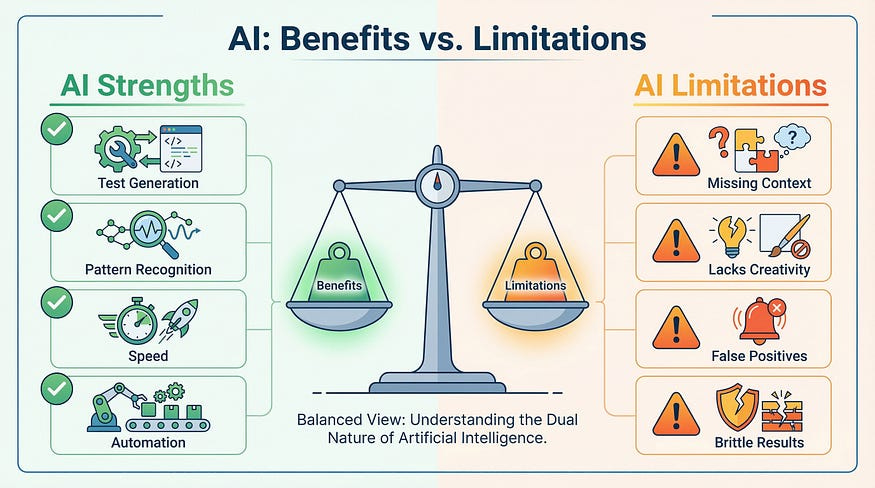
The Problems with AI in Debugging
AI debugging tools have similar limitations:
1. AI Suggests Without Understanding
The Problem: AI might suggest a fix that works superficially but doesn’t address the real root cause or introduces new problems.
Example: For a memory leak, AI suggests adding a cache size limit. This masks the symptom but doesn’t fix the actual leak — objects that should be garbage collected aren’t being released.
What This Means: Developers must understand the suggestion and verify it actually solves the underlying problem.
2. AI Can’t Debug Complex State Issues
The Problem: Bugs that depend on complex application state, timing, or rare race conditions are extremely difficult for AI to diagnose.
Example: A bug that only occurs when: (1) a user has been logged in for 6+ hours, (2) they have exactly 3 items in cart, (3) they’re on a slow network, and (4) they click submit during a background sync. AI won’t identify this confluence of conditions.
What This Means: Human debugging skills remain essential for complex, non-obvious issues.
3. Security Vulnerabilities
The Problem: AI tools can inadvertently suggest code that introduces security vulnerabilities if they’re trained on code with security issues.
Example: AI suggests using string concatenation to build SQL queries — a textbook SQL injection vulnerability — because it saw this pattern in legacy training data.
What This Means: Developers must review AI-generated code with security in mind.
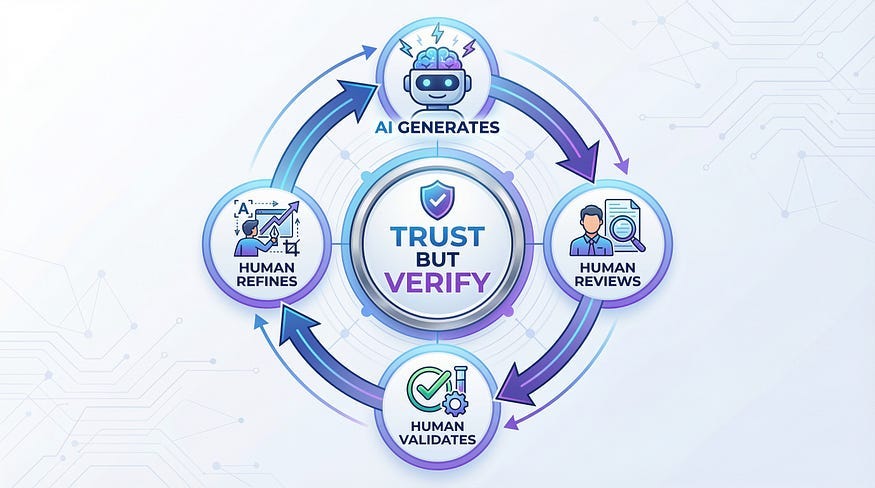
Using AI Responsibly: The “Trust But Verify” Approach
The key to using AI effectively in both testing and debugging is the “Trust But Verify” approach we’ll emphasize throughout this series:
Trust: Use AI to generate ideas, speed up repetitive tasks, and provide suggestions But Verify: Apply your expertise to evaluate, validate, and improve what AI produces
Practical Guidelines:
Use AI for initial test case generation, then review and refine based on risk and context
Let AI suggest debugging approaches, but understand the root cause yourself before implementing fixes
Use AI to identify patterns, but validate they’re actually meaningful patterns
Let AI handle repetitive analysis, but make strategic decisions yourself
Learn from AI suggestions — ask yourself “why did it suggest this?” to deepen your own understanding
Why Understanding Testing vs Debugging Matters Even More with AI
Here’s why the distinction we’ve been discussing becomes more important with AI, not less:
For Testing:
AI can execute tests, but it can’t decide what’s worth testing (you need to understand test strategy)
AI can generate test cases, but it can’t prioritize them by risk (you need to understand context-dependent testing)
AI can find patterns, but it can’t determine if they’re meaningful (you need testing principles)
For Debugging:
AI can suggest causes, but it can’t verify the root cause (you need debugging skills)
AI can propose fixes, but it can’t ensure they don’t introduce new issues (you need code comprehension)
AI can analyze logs, but it can’t understand business impact (you need domain knowledge)
The Bottom Line: AI is powerful, but it’s a tool that requires skilled operators. Understanding the fundamental difference between testing (finding problems) and debugging (solving problems) allows you to use AI appropriately in each context.
AI: Assistant, Not Replacement
As we continue through this series, you’ll see this theme repeated: AI amplifies expertise, it doesn’t replace it.
The testers and developers who thrive in the AI age won’t be those who blindly trust AI tools. They’ll be professionals who:
Understand fundamental principles deeply
Use AI to work faster and explore more
Apply critical thinking to AI suggestions
Know when to override AI recommendations
Continuously validate AI outputs
This is why we’re building your foundation before diving into AI tools. By the time we reach the AI integration articles (months 10–12), you’ll have the expertise to use these tools effectively and responsibly.
Practical Skills for Each Activity
Skills That Make You a Better Tester
Domain knowledge: Understanding the business and user needs
Critical thinking: Questioning assumptions and exploring edge cases
Communication: Writing clear, actionable bug reports
Test design: Creating efficient, comprehensive test coverage
Exploration: Finding problems that weren’t anticipated
Attention to detail: Noticing subtle issues
Debugging fundamentals: Understanding how to investigate and isolate root causes
Skills That Make You a Better Debugger
Programming knowledge: Understanding code structure and syntax
Analytical thinking: Breaking down complex problems logically
System knowledge: Understanding architecture and dependencies
Tool proficiency: Using debuggers, IDEs, and diagnostic tools effectively
Patience and persistence: Working through difficult problems
Problem-solving: Forming and testing hypotheses
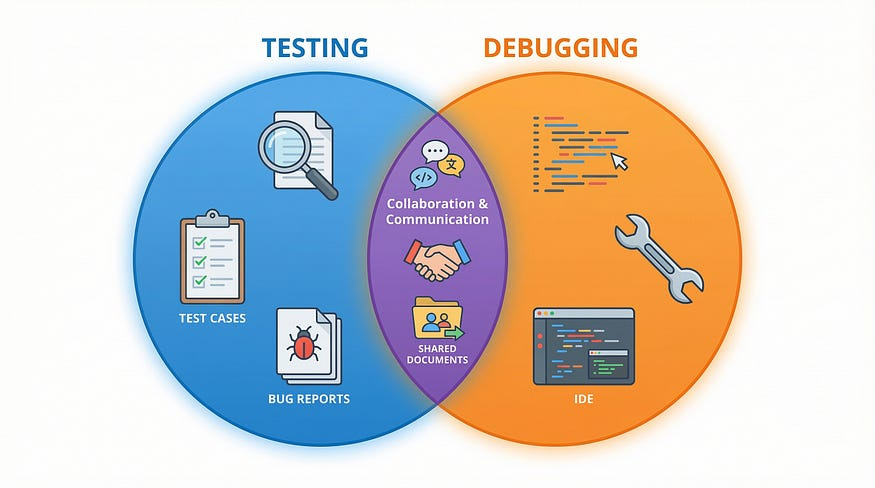
Skills That Help Both
Collaboration: Working effectively with team members
Documentation: Recording findings and processes clearly
Technical curiosity: Wanting to understand how things work
Systematic thinking: Following logical processes
Learning mindset: Continuously improving your skills
Your Role as a Tester
As you develop your testing career, remember:
Your primary value is in finding problems and investigating their causes. While developers implement the fixes, testers who can thoroughly investigate and isolate root causes become invaluable team members. You’re the independent voice that represents users and quality, bringing a different perspective than developers — and that’s exactly what makes testing valuable.
Learning debugging skills is essential for career growth:
You’ll write bug reports that developers actually want to read
You’ll gain respect and credibility with development teams
You’ll solve problems faster and more thoroughly
You’ll open doors to senior testing roles and SDET positions
You’ll become a true collaborator in quality, not just a bug reporter
Great testers don’t just say “it’s broken” — they investigate deeply, provide context, isolate conditions, and help the team understand the full scope of the issue. This requires debugging skills.
You don’t need to be a developer to be an excellent tester, but you should absolutely develop debugging skills. The best testers combine testing expertise with technical investigation abilities.
Action Steps
Before our next article, practice distinguishing testing from debugging:
Observe your own behavior: Next time you encounter a bug in any software, notice your first instinct. Do you think “What’s wrong?” (testing mindset) or “Why is this wrong?” (debugging mindset)?
Write a practice bug report: Find a small bug in any application and practice writing a clear bug report — focus only on describing what’s wrong, not proposing solutions
If you code: Try deliberately separating testing from debugging in your own work. Test first, then debug separately.
Reflect on skills: Which activities energize you more — finding problems or solving them? This insight can guide your career choices.
Moving Forward
Understanding the difference between testing and debugging sets you up for success in your testing career. You now know:
These are distinct but complementary activities
Testing finds problems; debugging solves them
Different skills and mindsets apply to each
Both are essential for software quality
Your role as a tester is valuable and unique
In our next article, we’ll explore The Psychology of Testing — why finding bugs requires a different mindset than building software, and how to develop the critical thinking skills that make great testers.
Remember: Testing and debugging aren’t in competition — they’re collaborators in the pursuit of quality. Both roles are essential, and understanding the distinction makes you better at whichever one you choose.
Next Article: The Psychology of Testing — Why finding bugs requires a different mindset than building software