
Session-Based Test Management
Organizing exploratory testing effectively

“So what did you actually test today?”
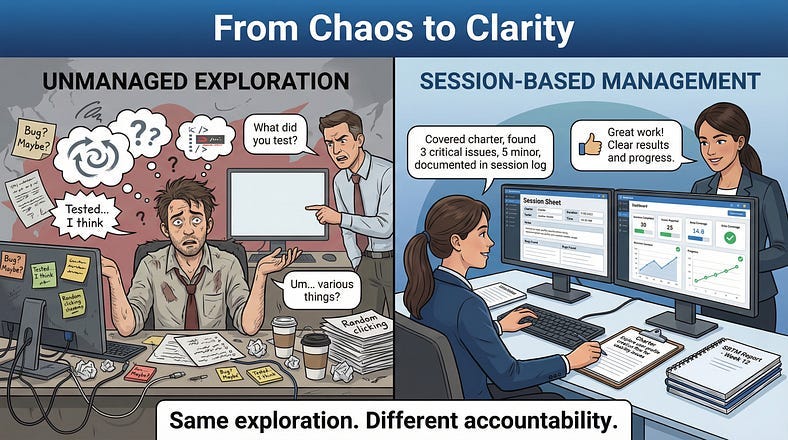
The question hung in the air. The tester had spent six hours doing exploratory testing. She’d found three bugs, submitted the reports, and felt productive. But when the test manager asked for specifics — what areas were covered, what wasn’t tested yet, how much more time was needed — she struggled to answer.
“I tested… a lot of things. I explored the checkout flow. And the user profile. And some other areas.”
“Which parts of checkout? What about payment edge cases? Did you cover the new discount feature?”
Silence.
This is the accountability problem with exploratory testing. When testing is unscripted, how do you track what’s been done? How do you report progress? How do you know when you’re finished? How do you coordinate multiple testers without duplicating effort or leaving gaps?
Session-Based Test Management (SBTM) solves these problems.
Developed by Jon and James Bach in the early 2000s, SBTM provides a framework that brings structure and accountability to exploratory testing without sacrificing the freedom that makes it powerful. It’s not about controlling testers — it’s about making their work visible, measurable, and manageable.
Today we’re examining how SBTM works, why it matters, and how to implement it in your own testing practice.
What Is Session-Based Test Management?
Session-Based Test Management is a method for organizing, tracking, and measuring exploratory testing through defined sessions with clear structures and deliverables.
The core concept is simple: instead of open-ended “exploratory testing,” you conduct discrete sessions — focused blocks of uninterrupted testing time with a specific mission, documented results, and measurable metrics.
The key components:
Sessions: Time-boxed periods of exploratory testing, typically 60–120 minutes, with a defined focus.
Charters: Mission statements that describe what each session will investigate and why.
Session Reports: Documentation of what was tested, what was found, and what remains to be done.
Debriefs: Conversations between testers and managers to review session results and plan next steps.
Metrics: Quantitative measures of testing progress and coverage.
SBTM doesn’t change how you explore. It changes how you organize, track, and communicate that exploration. The testing itself remains creative and adaptive. The management wrapper makes it accountable and visible.
Think of it as jazz with a setlist. The musicians still improvise — that’s the whole point. But they know which songs they’re playing, how long each set lasts, and they can tell the audience what to expect.
The Anatomy of a Session
A session is the atomic unit of SBTM. Understanding its structure is essential.
Time-Boxing
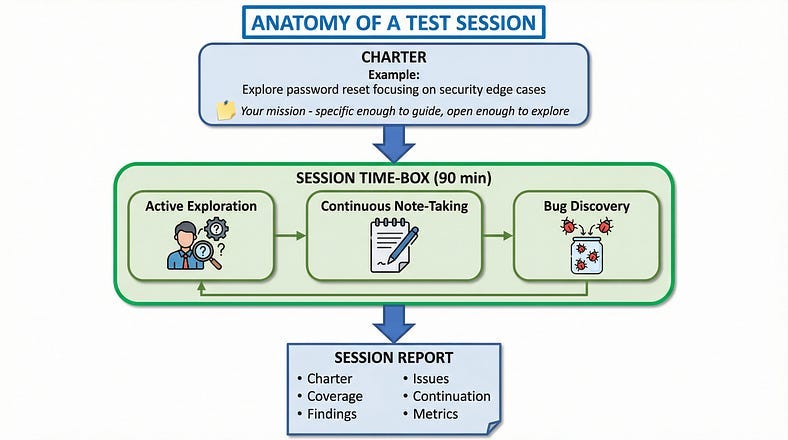
Sessions have defined durations. The standard is 90 minutes, but sessions can range from 45 to 120 minutes depending on context.
Why time-boxing matters:
Focus: Limited time forces concentrated attention. You can’t wander indefinitely.
Manageability: Fixed durations make planning and tracking straightforward.
Natural breakpoints: Time boundaries create moments for documentation, reflection, and redirection.
Sustainable pace: Intense exploration is mentally taxing. Time-boxes prevent burnout.
The 90-minute standard isn’t arbitrary — it aligns with natural cognitive rhythms. Attention degrades after about 90 minutes of intense focus. Shorter sessions may not allow deep investigation. Longer sessions lead to fatigue and diminishing returns.
The Charter
Every session begins with a charter — a mission statement that defines the session’s purpose. A charter answers: What are we investigating? Why does it matter? What areas are in scope?
Good charters provide direction without dictating actions. They’re focused enough to guide exploration but open enough to allow discovery.
We’ll dive deep into charter writing in our next article. For now, understand that the charter is your session’s compass — it keeps you oriented without prescribing your exact path.
Session Execution
During the session, the tester explores according to the charter, taking notes continuously.
Session notes capture:
Test notes: What you tested and how. What variations you tried. What paths you followed.
Bug notes: Issues discovered, with enough detail to reproduce or investigate further.
Issue notes: Concerns, questions, or potential problems that aren’t confirmed bugs.
Setup notes: Time spent on preparation, configuration, or blocked waiting for systems.
These notes don’t need to be formal. They need to be useful — capturing enough information to reconstruct what happened and support meaningful debriefs.
The Session Report
After the session, notes become a session report — a structured summary of the session’s work and findings.
Standard session report elements:
Charter: The mission that guided the session.
Tester: Who conducted the session.
Date and duration: When and how long.
Coverage: What areas, features, or scenarios were explored.
Test notes summary: Key observations and approaches.
Bugs found: List of issues discovered (with references to detailed bug reports).
Issues: Concerns or questions requiring follow-up.
Continuation: What remains to explore in future sessions.
Metrics: Time allocation (see below).
This report makes the session’s work visible and creates an artifact for tracking overall testing progress.
Session Metrics: Making Exploration Measurable
One of SBTM’s most valuable contributions is bringing metrics to exploratory testing. These metrics enable planning, tracking, and reporting without constraining the exploration itself.
Time Allocation Categories
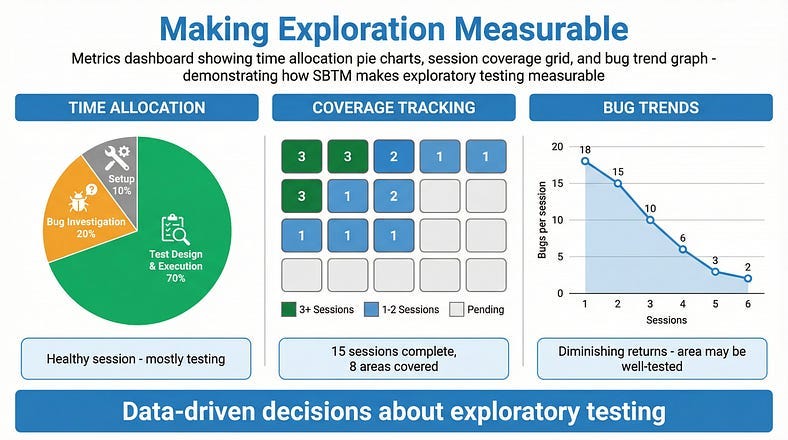
During sessions, time is categorized into three buckets:
Test Design and Execution (TDE):
Time spent actually testing — exploring, investigating, executing test ideas.
Bug Investigation and Reporting (BIR):
Time spent documenting bugs, investigating issues, and writing reports.
Setup and Administration (Setup):
Time spent on preparation, environment configuration, waiting for systems, or dealing with blockers.
At the session’s end, testers estimate the percentage of time in each category:
Example: 75% TDE, 15% BIR, 10% Setup
Why These Metrics Matter
TDE percentage indicates how much actual testing happened. Low TDE suggests environment problems, blockers, or inefficiencies that need addressing.
BIR percentage indicates bug density. High BIR suggests the area has many issues. It also flags sessions where more bugs were found than could be fully investigated.
Setup percentage indicates friction. Consistently high setup suggests tooling or environment improvements needed.
Over time, these metrics reveal patterns. A tester averaging 40% setup time needs better tooling. A feature generating 30% BIR time is bug-dense and needs attention.
Coverage Metrics
Beyond time allocation, SBTM tracks coverage:
Sessions completed: How many sessions have been conducted in each area?
Charter completion: What percentage of planned charters have been executed?
Risk coverage: Have high-risk areas received adequate session attention?
Coverage gaps: What areas haven’t been explored yet?
These metrics answer the critical questions: How much testing have we done? How much remains? Where are the gaps?
Bug Metrics
SBTM also enables bug analysis:
Bugs per session: How many issues is exploration finding?
Bug clustering: Which areas are yielding the most bugs?
Bug severity distribution: Are we finding critical issues or minor ones?
Tracking bugs per session over time shows whether exploration is still productive or reaching diminishing returns.
The Debrief: Where Learning Happens
Sessions produce findings. Debriefs transform findings into insight.
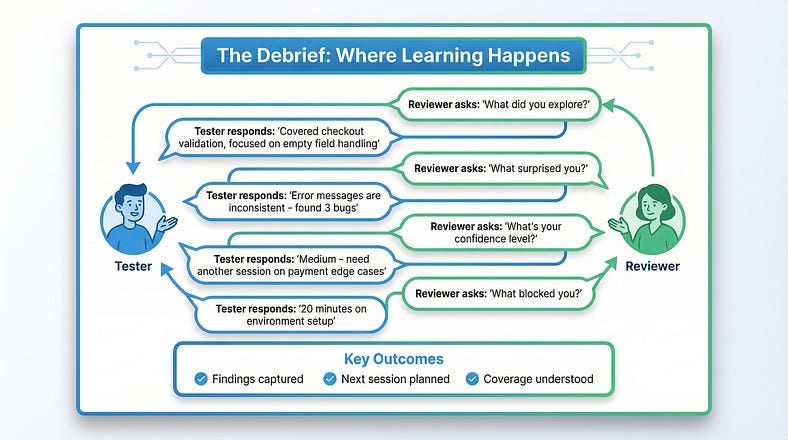
A debrief is a conversation between the tester and a reviewer (often a test lead or manager) about what happened in the session. It’s not an interrogation or status check — it’s a collaborative discussion that benefits both parties.
Why Debriefs Matter
For the tester:
Articulating findings deepens understanding
External perspective catches things you missed
Guidance helps plan next steps
Recognition of good work motivates
For the reviewer:
Real-time insight into testing progress
Early warning of problems or risks
Understanding of what coverage exists
Information for stakeholder communication
For the team:
Knowledge sharing across testers
Identification of patterns across sessions
Coordination of coverage
Continuous process improvement
The Debrief Conversation
A typical debrief covers:
Charter review: What was the mission? Did the session stay on charter, or did it evolve?
Coverage discussion: What did you explore? What techniques did you apply? What didn’t you get to?
Findings review: Walk through bugs found, issues identified, questions raised.
Obstacles: What blocked or slowed you? Environment issues? Missing information?
Continuation: What should come next? More sessions in this area? Different focus?
Metrics review: How was time allocated? What does that indicate?
Effective Debrief Practices
Keep it conversational. Debriefs shouldn’t feel like formal reporting. They’re discussions between colleagues.
Ask probing questions. “What surprised you?” “What didn’t you test that you wish you had?” “What’s your confidence level in this area?”
Focus on learning, not judgment. The goal is understanding, not evaluating the tester’s performance.
Time-box appropriately. 15–30 minutes is typical. Longer suggests sessions may be too broad.
Document key points. Capture important insights, decisions, and action items.
Feed back into planning. What you learn in debriefs should influence future charters.
Debrief Frequency
How often to debrief depends on context:
After every session: Most thorough, appropriate for critical testing or newer testers.
Daily: Batch debriefs for all sessions that day. Efficient for experienced testers.
As-needed: For very experienced testers working independently. Risk of missing insights.
More frequent debriefs mean more overhead but also more opportunities for course correction. Find the balance that works for your team.
Organizing Multiple Sessions
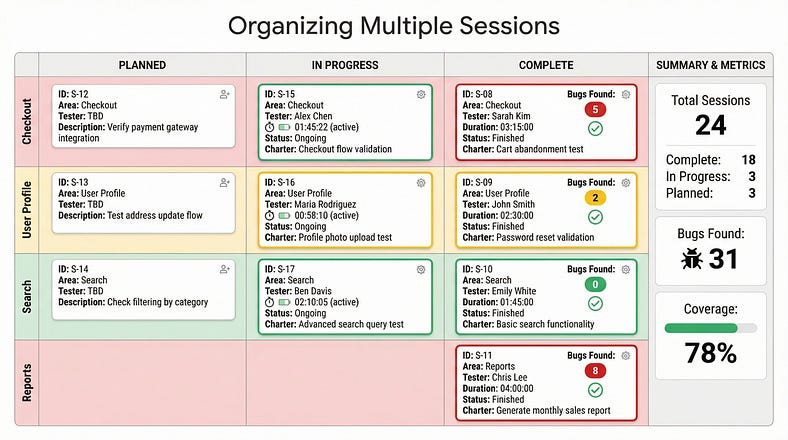
A single session is straightforward. Coordinating dozens of sessions across multiple testers is where SBTM’s organizational power becomes essential.
The Session Sheet
A session sheet is the primary tracking document — a record of all sessions planned, in progress, and completed.
Session sheet columns typically include:
Session ID (unique identifier)
Charter (brief description)
Tester (who’s assigned or who conducted it)
Status (planned/in progress/complete)
Duration (actual time spent)
Date (when conducted)
Bugs found (count)
Summary (brief outcome)
Continuation (follow-up needed?)
This sheet provides at-a-glance visibility into testing progress.
Coverage Mapping
Beyond the session sheet, teams often create coverage maps showing which areas have been explored and to what depth.
A coverage map might show:
Features or areas as rows
Session count per area
Risk level per area
Bugs found per area
Confidence assessment
This visualization quickly reveals where testing has focused and where gaps exist.
Coordinating Testers
When multiple testers are exploring, coordination prevents duplication and ensures coverage:
Charter assignment: Different testers take different charters, avoiding overlap.
Area ownership: Each tester owns specific areas, building deep expertise.
Bug awareness: Testers share findings so others can avoid duplicate discovery.
Coverage balancing: Ensure high-risk areas get adequate attention from skilled testers.
Daily standups or coordination meetings keep everyone aligned on who’s testing what and what’s been found.
Progressive Coverage
As testing progresses, the charter backlog evolves:
Initial sessions: Broad exploration to understand the landscape and find obvious bugs.
Deep dive sessions: Focused exploration of complex or risky areas.
Follow-up sessions: Investigation of issues discovered earlier.
Confirmation sessions: Verification that fixes work and haven’t caused regressions.
Diminishing returns sessions: Continued exploration with awareness that major bugs are likely found.
Tracking where each area falls in this progression helps allocate testing effort effectively.
Implementing SBTM in Your Team
Ready to adopt session-based test management? Here’s how to implement it effectively.
Start Simple
Don’t try to implement everything at once. Begin with the basics:
Define session length. Start with 90 minutes as default.
Create charter templates. Provide examples so testers understand good charters.
Establish note-taking expectations. What should session notes capture?
Implement basic debriefs. Even informal conversations after sessions.
Track sessions simply. A spreadsheet is enough to start.
Add sophistication as the practice matures.
Train Your Testers
SBTM requires testers to work differently. Invest in training:
Charter creation: How to write focused, effective missions.
Note-taking discipline: What to capture and how.
Time awareness: Tracking time allocation across categories.
Debrief participation: How to articulate findings clearly.
Self-management: Staying focused during sessions, knowing when to stop.
Establish the Debrief Habit
Debriefs are often the first thing cut when time is short. That’s a mistake — they’re where much of SBTM’s value is generated.
Make debriefs non-negotiable. Schedule them. Protect the time. Ensure they happen.
Even five-minute debriefs are better than none. The conversation matters more than the duration.
Evolve Your Metrics
Start with basic metrics:
Sessions completed
Bugs found per session
Time allocation percentages
As you mature, add:
Coverage by risk area
Bug density by area
Session productivity trends
Blocker analysis
Use metrics to improve the process, not to judge individuals.
Integrate with Your Process
SBTM should complement your existing process, not replace it entirely:
With Agile: Sessions fit naturally into sprints. Charter backlogs align with story backlogs.
With automation: Use sessions to explore what automation doesn’t cover. Let exploration inform automation priorities.
With scripted testing: Use SBTM for exploratory coverage while maintaining scripts for regression.
With bug tracking: Link session reports to bug reports. Track which sessions found which bugs.
Common Implementation Pitfalls
Over-formalizing: SBTM should add structure, not bureaucracy. If paperwork exceeds testing, you’ve gone too far.
Treating metrics as targets: Metrics inform decisions. They shouldn’t pressure testers to game numbers.
Skipping debriefs: Without debriefs, sessions become isolated events. Debriefs create organizational learning.
Rigid charters: Charters guide; they don’t constrain. Testers should deviate when exploration leads somewhere important.
Ignoring continuation: Every session generates ideas for future sessions. Capture and use this information.
SBTM and Modern Testing
How does session-based test management fit with modern testing practices?
SBTM and Agile
SBTM aligns naturally with Agile:
Sessions fit into sprints
Charter backlogs parallel story backlogs
Debriefs happen in daily standups
Coverage reports support sprint reviews
Continuous exploration matches iterative development
Many Agile teams find SBTM provides the accountability needed for exploratory testing without the overhead of traditional test planning.
SBTM and DevOps
In continuous delivery environments:
Sessions can be short and frequent
Charters focus on recent changes
Debriefs inform deployment decisions
Metrics feed into quality dashboards
Exploration happens alongside automated pipelines
SBTM helps ensure human testing keeps pace with rapid release cycles.
SBTM and AI
As AI tools enhance testing:
AI can suggest charters based on code changes
AI can analyze session notes for patterns
AI can identify coverage gaps across sessions
AI can generate initial exploration paths
Human judgment remains essential for actual exploration. SBTM provides the structure to coordinate human and AI contributions.
Reporting and Communication
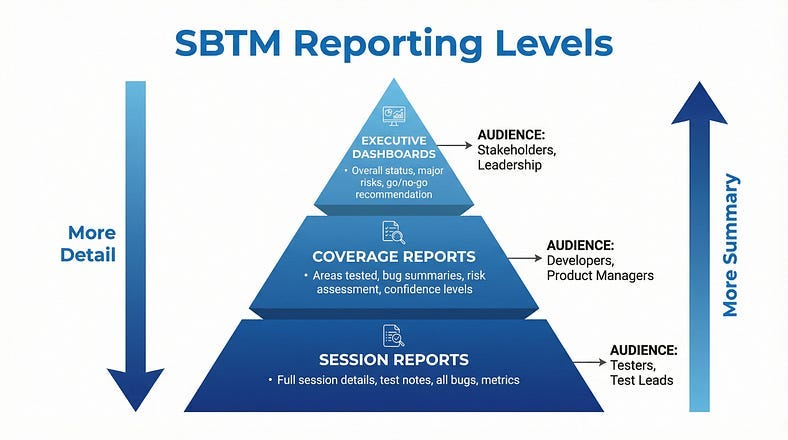
SBTM generates information that stakeholders need. Translating session data into useful reports is essential.
Daily Status
For day-to-day communication:
Sessions completed today
Bugs found today
Key findings or concerns
Blockers or risks
Tomorrow’s focus
Keep it brief. Details live in session reports.
Coverage Reports
For release readiness or milestone assessment:
Areas tested and session counts
Risk areas and coverage depth
Bug counts and severity distribution
Outstanding issues and concerns
Confidence assessment
Use coverage maps and metrics to support narrative assessment.
Trend Reports
For process improvement:
Sessions over time
Bugs per session trends
Time allocation patterns
Blocker frequency
Coverage velocity
These reports inform decisions about testing efficiency and resource allocation.
Stakeholder Communication
Different stakeholders need different information:
Developers: Want to know what was tested and what bugs were found. Appreciate specific, actionable findings.
Product managers: Want to know readiness status and risk assessment. Care about user-facing issues.
Executives: Want to know overall quality status and major risks. Need high-level summaries.
Tailor your reporting to your audience. SBTM data can serve all these needs.
Your SBTM Starter Kit
Ready to start using session-based test management? Here’s what you need:
Session Report Template
SESSION REPORT
==============
Session ID: ________
Charter: ________
Tester: ________
Date: ________
Actual Duration: ________
TIME ALLOCATION:
- Test Design & Execution: ____%
- Bug Investigation & Reporting: ____%
- Setup & Administration: ____%COVERAGE:
What I tested:
-
-
- What I didn’t test (ran out of time / out of scope):
-
- FINDINGS:
Bugs found: (list with IDs)
-
- Issues/Concerns:
-
- Questions raised:
-
- CONTINUATION:
Should this area be explored further? Yes / No
Suggested follow-up charters:
-
- OVERALL ASSESSMENT:
Confidence in this area: High / Medium / Low
Notes:Debrief Checklist
DEBRIEF CHECKLIST
=================
□ Charter review: Was the mission clear? Did you stay on charter?
□ Coverage: What did you explore? What techniques did you use?
□ Findings: Walk through bugs and issues found
□ Surprises: What was unexpected?
□ Obstacles: What blocked or slowed you?
□ Confidence: How do you feel about quality in this area?
□ Continuation: What should come next?
□ Metrics: Review time allocation
□ Action items: What needs to happen based on this session?
Tracking Spreadsheet Columns
Session ID
Charter (brief)
Area/Feature
Tester
Status (Planned / In Progress / Complete)
Planned Date
Actual Date
Duration
Bugs Found
Follow-up Needed?
Notes
Your First SBTM Week
Here’s a practical guide to your first week using SBTM:
Day 1: Setup
Create your charter backlog (10–15 charters for different areas)
Set up your session tracking spreadsheet
Prepare your session report template
Schedule 15 minutes daily for debriefs
Day 2–3: First Sessions
Conduct 2–3 sessions with different charters
Focus on following the process, not perfection
Take notes continuously during sessions
Complete session reports immediately after
Day 4: Reflect and Adjust
Review your session reports
What worked well? What felt awkward?
Adjust templates if needed
Conduct debrief (with yourself if solo, with lead if on team)
Day 5: Iterate
Continue sessions with adjustments
Track coverage across sessions
Identify patterns in your findings
Plan next week’s charters based on learning
After one week, you’ll have practical experience with the framework and ideas for making it work better for your context.
From Sessions to Strategy
SBTM transforms exploratory testing from untracked activity into a managed practice. But the framework is means to an end, not an end itself.
The ultimate goal isn’t perfect session reports or precise metrics. It’s effective testing that finds important bugs, provides accurate quality assessment, and enables informed release decisions.
Use SBTM to:
Ensure coverage: Know what’s been tested and what hasn’t.
Enable accountability: Show stakeholders what testing actually happened.
Improve efficiency: Identify blockers, optimize processes, allocate resources well.
Generate learning: Build organizational knowledge through debriefs and patterns.
Maintain flexibility: Keep the creative power of exploration while adding structure.
When SBTM feels bureaucratic, simplify it. When it feels too loose, tighten it. The framework serves the testing, not the other way around.
In our next article, we’ll explore Test Charter Writing — the art of crafting focused missions that guide exploration without constraining it. We’ll examine what separates vague charters from powerful ones, provide templates for different testing situations, and show how well-written charters transform scattered exploration into strategic investigation.
Remember: Exploratory testing isn’t chaos unless you let it be. Session-Based Test Management proves that freedom and accountability can coexist.