
Monkey Testing Explained: Random Testing with Purpose
What a Toddler Can Teach You About Software Quality

Hand a three-year-old your phone. Don’t give them instructions, don’t tell them what the app does, and definitely don’t tell them what not to touch. Then watch.
Within sixty seconds, a toddler will do things to your application that no test plan, no charter, and no experienced tester would ever think to do. They’ll tap the screen with four fingers simultaneously. They’ll swipe in the middle of a loading animation. They’ll rotate the phone upside down while a modal dialog is open. They’ll press the home button and the volume button and try to drag an image off the screen all at the same time. They have no understanding of what the application is supposed to do, no model of correct behavior, and absolutely no respect for the intended user workflow.
And in that chaotic sixty seconds, they’ll crash the app twice.
This isn’t a theoretical scenario. A product manager at a fintech company once told me that their most embarrassing production outage was discovered by his daughter. She’d gotten hold of his phone during a demo, hammered the “transfer” button about thirty times in rapid succession while the confirmation dialog was still loading, and somehow triggered a race condition that duplicated transactions. The team had hundreds of test cases for the transfer flow. Not one of them involved pressing the button thirty times in under two seconds, because no reasonable adult would do that. But software doesn’t only serve reasonable adults — it serves everyone, on every device, in every state of attention and distraction, including the states where users behave in ways nobody anticipated.
This is the core insight behind monkey testing: sometimes the most revealing test is the one no rational person would design. Randomness finds what logic misses.
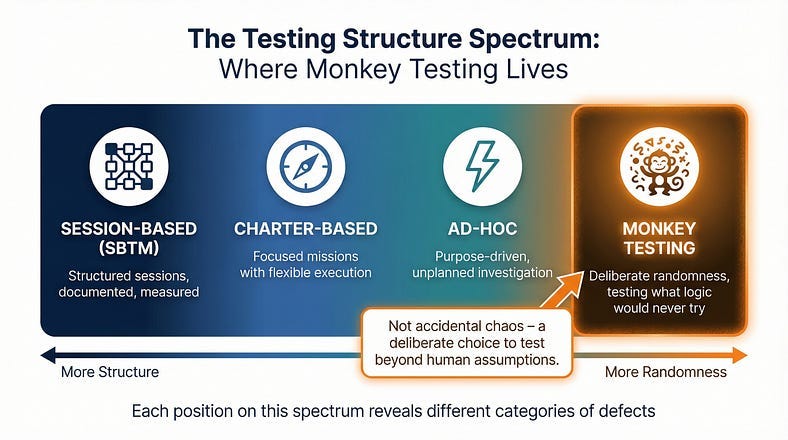
We’ve been traveling along a spectrum in this series. Session-Based Test Management gave us structure for organizing exploration. Charter writing gave us focused missions. Ad-hoc testing gave us purposeful freedom from those structures. Now we arrive at the far end of that spectrum — testing that is deliberately, systematically random. Not careless. Not chaotic. Random with purpose, because the goal isn’t to simulate thoughtful usage. The goal is to discover what happens when usage is anything but thoughtful.
What Monkey Testing Actually Is
Monkey testing is a technique where a tester — or more commonly, a tool — interacts with software using random or semi-random inputs and actions, without any reference to expected behavior, defined test cases, or application knowledge. The name comes from the infinite monkey theorem: given enough random input over enough time, every possible interaction will eventually occur, including the ones that break things.
The defining characteristic of monkey testing is the absence of an oracle. In most testing, you know what the software should do, and you’re checking whether it does it. In monkey testing, you often don’t know what the correct behavior is for a given random input. Instead, you’re looking for a specific category of failure: crashes, hangs, unhandled exceptions, data corruption, security violations, and any other response that’s wrong regardless of what the “right” answer would be. You may not know what should happen when a user submits a form containing 50,000 characters of emoji mixed with control characters — but you know the application shouldn’t crash, corrupt its database, or expose a stack trace.
This gives monkey testing a unique role in your testing strategy. It doesn’t validate that features work correctly. It validates that the system fails gracefully under unexpected conditions. It tests resilience, not correctness.
A simple example illustrates the difference. If you’re testing a search function, a charter-based session might explore how the search handles various query types to verify results are accurate and relevant. Monkey testing would throw thousands of random character combinations at the search field — binary data, extremely long strings, null bytes, nested quotation marks, SQL fragments — not to check whether the results make sense, but to find out whether any input can crash the search service, trigger an unhandled exception, or cause the page to render incorrectly.
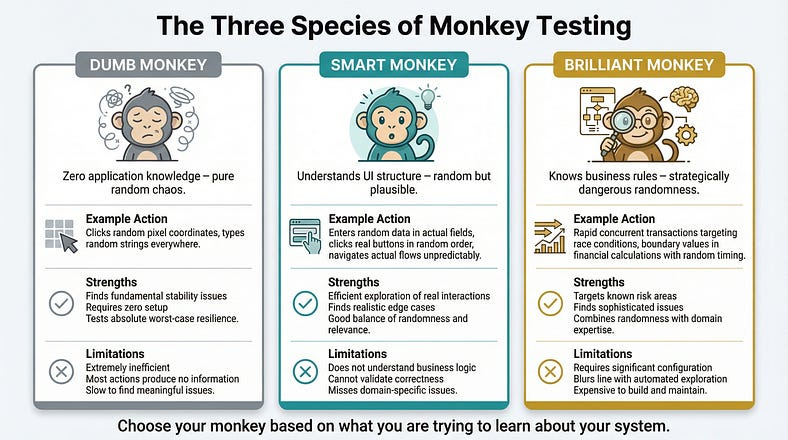
The Three Species of Monkey
Not all monkey testing is the same. The approach varies depending on how much the “monkey” knows about the application it’s testing.
Dumb Monkey Testing
A dumb monkey has zero knowledge of the application. It generates completely random inputs: random clicks at random screen coordinates, random keystrokes, random gestures. It doesn’t know what a button is, doesn’t understand forms, and can’t navigate menus intentionally. It’s pure chaos.
Example in practice: A dumb monkey tool pointed at a web application might click random pixel coordinates, type random strings into whatever element happens to have focus, randomly submit forms with garbage data, and navigate to random URLs within the domain. Most of these actions will be meaningless — clicking on empty space, typing into non-editable elements. But over thousands of iterations, the monkey will occasionally stumble into combinations that matter: submitting a form with binary data in a text field, clicking a delete button that lacked a confirmation dialog, or navigating to an API endpoint that returns unhandled raw data.
When it’s useful: Dumb monkey testing is most valuable early in development or when you need a baseline resilience check. If a dumb monkey can crash your application, you have fundamental stability problems that need fixing before more sophisticated testing makes sense.
The limitation: Dumb monkeys are inefficient. The vast majority of their actions produce no useful information. They might spend thousands of interactions clicking on background images and typing into read-only fields before accidentally doing something interesting.
Smart Monkey Testing
A smart monkey understands the application’s structure. It knows what UI elements exist, which ones are interactive, what types of input each field expects, and how to navigate between screens. It uses this knowledge to generate random actions that are at least plausible — clicking actual buttons, entering data into actual fields, navigating through actual menus — but the choices about which button to click, what data to enter, and where to navigate are still random.
Example in practice: A smart monkey testing an e-commerce application would know that the search field accepts text input, so it would enter random strings there (not at random screen coordinates). It would know that the “Add to Cart” button is clickable, so it would click it at random points during browsing. It would know that the checkout flow has specific steps, so it would navigate through those steps in random order, skipping some, repeating others, and entering random (but structurally valid) data at each stage. It might add 99,999 items to the cart, apply seventeen discount codes simultaneously, and then try to check out with an expired credit card number from a country the system doesn’t serve.
When it’s useful: Smart monkey testing is the workhorse of the technique. It’s efficient enough to find real issues but random enough to explore scenarios that no human would design. Most modern monkey testing tools operate at this level.
The limitation: Smart monkeys still don’t understand business logic. They might find that the application doesn’t crash when you add 99,999 items, but they won’t notice that the price calculation is wrong for quantities over 10,000 — because they don’t know what the correct price should be.
Brilliant Monkey Testing
A brilliant monkey has deep knowledge of the application: its business rules, its data model, its common failure patterns, and its known problem areas. It generates random inputs that are specifically designed to probe weaknesses — using this knowledge to make its randomness strategically dangerous.
Example in practice: A brilliant monkey testing a banking application would know that race conditions are likely in concurrent transaction processing. So its “random” actions would include rapidly initiating multiple transfers from the same account, submitting duplicate payment requests with microsecond timing differences, and toggling between account views while background transactions are processing. The actions are random in their specific timing and combination, but the category of actions is strategically chosen to maximize the chance of finding real problems.
When it’s useful: Brilliant monkey testing bridges the gap between randomness and expertise. It’s particularly valuable for stress-testing known risk areas with unpredictable input patterns.
The limitation: Building a brilliant monkey requires significant investment in configuring its knowledge, and at some point, it starts to look less like monkey testing and more like automated exploratory testing — which is a different technique entirely.
What Monkey Testing Finds (That Other Testing Misses)
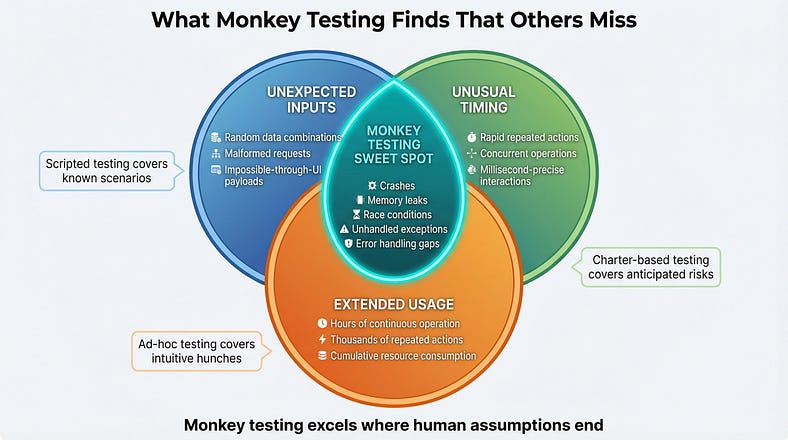
Monkey testing isn’t competing with your charter-based sessions or your scripted test cases. It’s finding a specific category of defect that those approaches are structurally unable to discover.
Unhandled Exceptions and Crashes
This is the bread and butter of monkey testing. Every application has input combinations and interaction sequences that developers never anticipated. Defensive coding should handle these gracefully — displaying a meaningful error, logging the issue, and continuing to function. Monkey testing reveals where that defensive coding has gaps.
Real example: A mobile banking app passed all 3,000 scripted test cases. A monkey testing tool found that rapidly switching between the transaction history and account summary screens while the app was refreshing data from the server caused a null pointer exception that crashed the application. The specific timing — switching screens during a network response — was something no human tester had tried because it required millisecond-precise interaction that felt unnatural.
Memory Leaks and Resource Exhaustion
Monkey testing’s random, prolonged interaction with an application naturally exercises it in ways that reveal resource management issues. If the monkey runs for hours, performing thousands of random actions, it creates the kind of extended, varied usage pattern that exposes memory leaks, connection pool exhaustion, and file handle accumulation that shorter, more focused testing sessions won’t trigger.
Real example: An internal project management tool worked perfectly in 30-minute testing sessions but crashed after about four hours of continuous use. Monkey testing ran overnight, performing random navigation and data entry for eight hours straight, and revealed that every time a user opened and closed the task detail panel, a small event listener wasn’t being cleaned up. After roughly 2,000 open/close cycles, the browser ran out of memory.
Race Conditions and Timing Issues
Human testers interact with software at human speed — one deliberate action at a time, with natural pauses in between. Monkey tools can fire actions in rapid succession, overlapping operations, and creating timing conditions that humans can’t easily replicate. This makes them excellent at finding race conditions, double-submit bugs, and concurrency issues.
Real example: An e-commerce platform’s wishlist feature worked flawlessly in all manual testing. A monkey tool that rapidly added and removed the same item to the wishlist — dozens of times per second — discovered that under high-speed concurrent operations, items could appear in the wishlist multiple times or be removed from the database without being removed from the display cache. The data became inconsistent in ways that only manifested under rapid repeated interaction.
Error Handling Gaps
When developers write error handling, they typically think about the errors they can imagine. Monkey testing generates errors that nobody imagined — and reveals whether the error handling is truly comprehensive or only covers the anticipated cases.
Real example: A form with server-side validation handled all the expected invalid input patterns with helpful error messages. But when a monkey testing tool submitted a request with a malformed JSON body (something impossible through the normal UI but possible through API manipulation), the server returned a raw 500 error with a stack trace that included database connection details. The error handling was thorough for UI-originated requests but completely missing for malformed requests at the API level.
How to Actually Do Monkey Testing
Understanding the concept is one thing. Running monkey testing effectively is another. Here’s how to do it in practice.
Choosing Your Approach: Manual vs. Tool-Based
Monkey testing can be done manually or with tools, and the choice matters.
Manual monkey testing means a human tester deliberately acts randomly — pressing keys without looking, clicking wildly, entering nonsensical data. This is useful for quick smoke-style checks (“can I crash this in five minutes of random interaction?”) but it’s limited by human speed and the difficulty of being truly random. Humans have habits, and even when trying to be random, we tend to repeat patterns. We click in similar areas, type similar strings, and follow similar navigation paths. True randomness is actually hard for people.
Tool-based monkey testing uses software to generate random interactions automatically. This is far more effective for sustained monkey testing because tools can generate thousands of interactions per minute, run for hours without fatigue, and produce genuinely random input patterns. They also capture logs of exactly what they did, making it possible to reproduce bugs they discover — a critical advantage over manual random testing, where recreating the exact sequence that caused a crash can be nearly impossible.
For most teams, the practical answer is tool-based for serious monkey testing, supplemented by occasional manual monkey testing as a quick sanity check.
Setting Up Effective Monkey Testing
Effective monkey testing requires some preparation, even though the testing itself is unscripted.
Define your crash oracle. Since monkey testing doesn’t validate correctness, you need automated ways to detect failures. At minimum, monitor for: application crashes, unhandled exceptions (check console logs and server logs), HTTP 500 errors, UI rendering failures (blank screens, missing elements), and significant memory growth over time. These are your “something went wrong” signals.
Seed your starting conditions. Monkey testing is more productive when the application is in a realistic state before the chaos begins. Log in as a user with real data. Navigate to a feature-rich screen. Populate the database with representative records. A monkey testing a blank application with no data won’t find the interesting bugs that only appear when real data is involved.
Set boundaries. Unless you’re specifically testing it, exclude actions that would have irreversible consequences — account deletion, payment processing against real services, data export to external systems. Most monkey testing tools support exclusion rules that prevent the monkey from clicking certain elements or navigating to certain areas.
Plan your monitoring. Before starting the monkey, set up the monitoring you’ll need to detect and diagnose issues: application logs, server monitoring, browser console capture, network traffic recording, and performance metrics. When the monkey finds a crash, you’ll need this data to understand what happened and reproduce the issue.
Running the Session
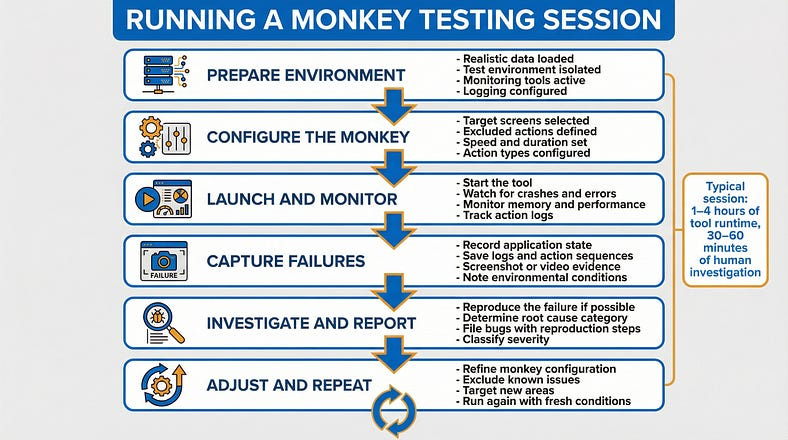
A typical monkey testing session follows this pattern:
Prepare the environment. Set up a test environment with realistic data. Ensure monitoring is active and logging is configured.
Configure the monkey. Set parameters: which screens to target, how long to run, what actions to include/exclude, how fast to interact.
Start the monkey and monitor. Launch the tool and watch the monitoring dashboards. You’re looking for crashes, errors, performance degradation, and anomalous behavior.
When something breaks, capture the evidence. Record the state of the application, the logs, and if possible, the sequence of actions that led to the failure. Many tools provide action logs for exactly this purpose.
Investigate and report. Determine whether the failure is a genuine bug or an expected limitation. File bugs for genuine issues, including the action sequence and environmental conditions.
Resume and repeat. Fix the configuration if needed (for example, if the monkey keeps hitting the same uninteresting error) and run again. Each run should ideally explore new territory.
Monkey Testing Tools: What’s Available
You don’t need to build your own monkey testing tool. Several proven options exist across different platforms.
For Android applications, Android’s built-in adb shell monkey command is the classic starting point. It generates random touch events, gestures, and system events at configurable speeds. It’s simple to run and comes free with the Android development tools. A basic command looks like adb shell monkey -p com.your.app --throttle 100 -v 10000, which sends 10,000 random events to your app with 100 milliseconds between each.
For web applications, tools like Gremlins.js inject random interactions into a browser page — clicking, typing, scrolling, and resizing — and can be configured to target specific elements or avoid certain areas. It runs directly in the browser and is quick to set up for basic chaos testing.
For iOS applications, tools are more limited due to platform restrictions, but frameworks like XCUITest can be scripted to generate semi-random interactions, and tools like SwiftMonkey (now archived but conceptually useful) provide inspiration for building random interaction generators within Apple’s testing ecosystem.
For API testing, tools like Burp Suite’s intruder, or custom scripts using libraries like Hypothesis (Python) or fast-check (JavaScript), can send randomized and fuzzed payloads to API endpoints. This is technically fuzzing rather than monkey testing, but the principle is the same: random input to discover unhandled conditions.
The key when selecting a tool is matching it to your goal. If you want basic crash detection, a simple tool with high-speed random input is sufficient. If you want intelligent exploration that covers more of the application’s functionality, you need a smarter tool that understands your application’s structure.
Monkey Testing vs. Everything Else
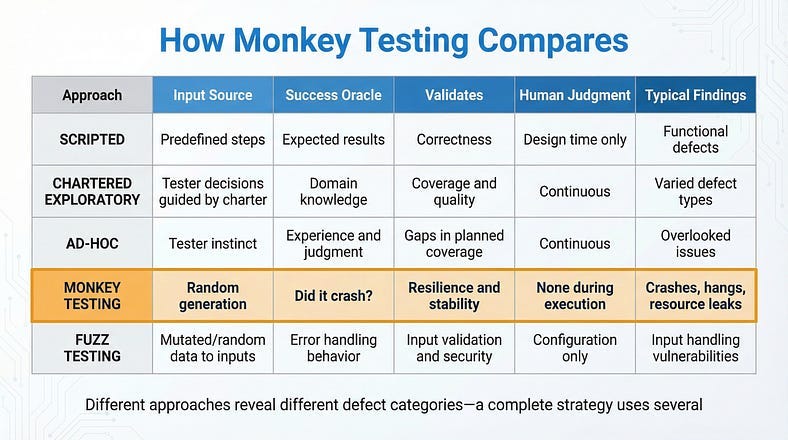
At this point in the series, we’ve covered several testing approaches along the structure spectrum. Let’s be precise about where monkey testing fits relative to each.
Monkey testing vs. ad-hoc testing. We covered ad-hoc testing in our previous article, and the distinction matters. Ad-hoc testing is driven by human judgment — the tester makes purposeful decisions about what to try, even without a formal plan. Monkey testing removes human judgment from the equation entirely. The actions are random, not purposeful. A tester doing ad-hoc testing thinks “this validation seems weak, let me probe it.” A monkey just throws random data everywhere and sees what breaks. Both have value; they find different things.
Monkey testing vs. chartered exploratory testing. Chartered sessions are guided by a specific mission: explore a target with specific techniques to discover specific information. Monkey testing has no mission beyond “don’t crash.” It doesn’t validate functionality, usability, or business logic. It validates resilience — the application’s ability to survive the unexpected.
Monkey testing vs. fuzz testing. These are close cousins. Fuzz testing sends malformed or random data specifically to inputs — API parameters, file parsers, form fields — to find input handling vulnerabilities. Monkey testing is broader: it randomizes the entire interaction pattern, including navigation, timing, and sequences of actions, not just individual inputs. Fuzz testing is a component of what a thorough monkey testing approach might include.
Monkey testing vs. stress testing. Stress testing pushes the system to its performance limits — high user counts, large data volumes, peak traffic conditions. Monkey testing may accidentally stress the system (by performing thousands of rapid actions), but its primary goal is randomness of behavior, not extremity of load. A monkey test might discover a crash at normal load that no stress test would find, because the crash is triggered by an unusual sequence rather than high volume.
When Monkey Testing Wastes Your Time
Monkey testing isn’t always the right tool. Knowing when to skip it is as important as knowing when to use it.
When your application already crashes from normal use. If testers are finding crashes through regular chartered exploration, monkey testing will just find more of the same — faster, but without the context needed to fix them. Fix the fundamental stability issues first, then use monkey testing to verify resilience.
When you need to validate business logic. Monkey testing will never tell you whether a discount calculation is correct, whether the right notification was sent, or whether a workflow follows the business rules. If your testing goal is correctness rather than resilience, use a different approach.
When you can’t monitor effectively. If you can’t detect failures automatically — through crash logs, error monitoring, or performance tracking — monkey testing’s output is essentially invisible. The monkey might cause ten crashes that nobody notices because nobody’s watching the logs. Invest in monitoring before investing in monkey testing.
When the environment isn’t isolated. Running a monkey against a shared development database or a production-adjacent environment is a recipe for collateral damage. The monkey doesn’t know not to delete all the test data, corrupt shared resources, or trigger alerts that wake up the on-call team. Always isolate your monkey testing environment.
When time is extremely limited. If you have two hours of testing time and a release to validate, those hours are better spent on focused, human-guided exploration than on watching a monkey randomly click around. Monkey testing is most productive as a regular practice — running overnight, during off-hours, or as part of continuous integration — not as a last-minute testing activity.
Making Monkey Testing Part of Your Strategy
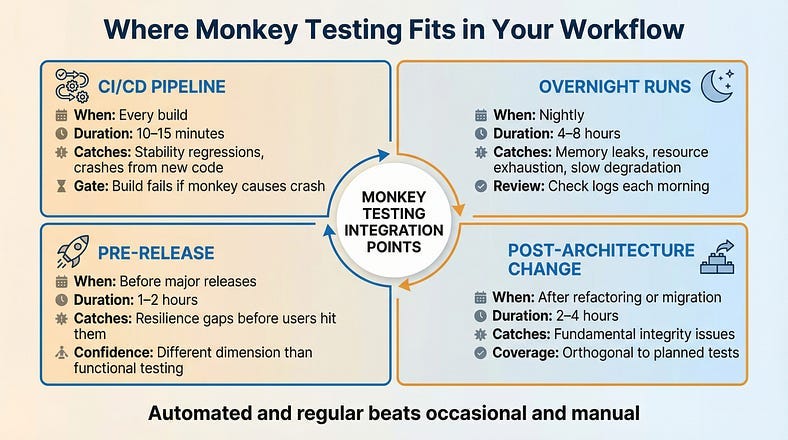
The highest-value deployment of monkey testing isn’t as an occasional manual exercise — it’s as an automated, regular part of your quality practice.
In Continuous Integration
Configure monkey testing to run automatically as part of your CI/CD pipeline. After each build, let a smart monkey interact with the application for a defined period — say, 15 minutes. If it causes any crashes or unhandled exceptions, the build fails. This creates a baseline resilience gate: no code ships if a random monkey can break it. Over time, this gate quietly catches stability regressions before they reach any human tester.
As Overnight Runs
Monkey tests are cheap to run unattended. Set up nightly monkey testing sessions that run for hours, exercising the application while the team sleeps. Review the logs each morning for new crashes, performance degradation, or error spikes. This extended, sustained randomness is where memory leaks and resource exhaustion issues surface.
Before Major Releases
Before any significant release, run an extended monkey testing session as a resilience check. This doesn’t replace your functional testing, your exploratory sessions, or your regression suite. It adds a different dimension of confidence: “We verified the features work correctly and we verified that random, unexpected interaction doesn’t crash the application.”
After Architecture Changes
Major refactoring, framework upgrades, infrastructure migrations — these changes affect the application’s fundamental behavior in ways that specific test cases might not cover. A monkey testing session after architecture changes tests the system’s overall integrity in a way that’s both thorough and orthogonal to your planned test coverage.
Interpreting Monkey Testing Results
When a monkey breaks something, you need to figure out whether the finding matters — and what to do about it.
The Severity Question
Not every monkey-discovered crash is a high-priority bug. A crash triggered by simultaneously submitting a form from two browser tabs opened to the same page while toggling airplane mode isn’t something real users will encounter often. But a crash triggered by pressing the back button during a page load is something users hit every day.
When evaluating monkey testing findings, ask three questions:
How likely is this in real usage? If the triggering conditions are extremely unlikely, the fix may be lower priority. But if the monkey is discovering failures through interactions that real users could plausibly perform — rapid double-taps, back navigation during loading, switching apps during a process — those bugs need urgent attention.
How severe is the impact? A crash that loses unsaved data is worse than a crash that simply requires reopening the app. A crash that exposes system internals (stack traces, database details) is a security concern. An error that silently corrupts data is worse than one that loudly fails.
How reproducible is it? Intermittent issues that the monkey triggered but you can’t reproduce may indicate timing-dependent bugs (race conditions, threading issues). These are some of the most dangerous bugs in production because they appear randomly and are notoriously hard to diagnose under pressure.
From Random Crash to Reproducible Bug
The biggest practical challenge of monkey testing is reproduction. The monkey performed 10,000 random actions and the app crashed somewhere around action 7,342. Which actions actually mattered?
Good monkey testing tools provide action logs that you can replay or at least review. The investigation process typically involves: reviewing the action log to identify what happened immediately before the crash, attempting to reproduce the failure using just those final actions, and progressively simplifying until you find the minimal set of actions that triggers the bug.
Often, what looks like a complex random failure turns out to be simple once you strip away the irrelevant actions. The monkey performed 10,000 actions, but the crash was actually caused by a two-step sequence: navigating to a specific screen while a background sync was in progress. The other 9,998 actions were noise — the monkey just happened to stumble into the dangerous combination through random exploration.
Your Monkey Testing Starter Kit
Here’s what you need to run your first monkey testing session this week.
MONKEY TESTING STARTER KIT
============================

BEFORE YOUR FIRST SESSION
Environment:
  [ ] Isolated test environment (NOT shared or production)
  [ ] Realistic data loaded
  [ ] Monitoring active (error logs, crash reports, performance)
  [ ] External integrations stubbed or sandboxed

Tool Selection:
  - Android: adb shell monkey (built-in)
  - Web: Gremlins.js (open source, browser-based)
  - API: Custom scripts with random payload generation
  - General: Your automation framework with randomized inputs

Configuration:
  [ ] Target screens/areas defined
  [ ] Excluded actions specified (delete, payment, etc.)
  [ ] Speed/throttle set (start moderate, increase later)
  [ ] Session duration defined

RUNNING YOUR FIRST SESSION
Round 1 - Dumb Monkey (30 minutes):
  - Pure random interaction, no configuration
  - Goal: Find fundamental stability issues
  - Watch for: Crashes, blank screens, unresponsive UI

Round 2 - Smart Monkey (60 minutes):
  - Configure to interact with actual UI elements
  - Goal: Find edge cases in real workflows
  - Watch for: Error handling gaps, state corruption

Round 3 - Targeted Monkey (60 minutes):
  - Focus on highest-risk area (recent changes, complex features)
  - Goal: Stress-test specific functionality
  - Watch for: Race conditions, data inconsistencies

AFTER THE SESSION
For each failure found:
  [ ] Capture logs and action sequence
  [ ] Attempt to reproduce manually
  [ ] Simplify to minimal reproduction steps
  [ ] Assess severity and real-world likelihood
  [ ] File bug report with reproduction steps
  [ ] Tag as monkey-testing-discovered

Session summary:
  Duration: _____
  Actions performed: _____ (approximate)
  Crashes found: _____
  Errors logged: _____
  Bugs filed: _____
  Areas that survived well: _____
  Areas that need human exploration: _____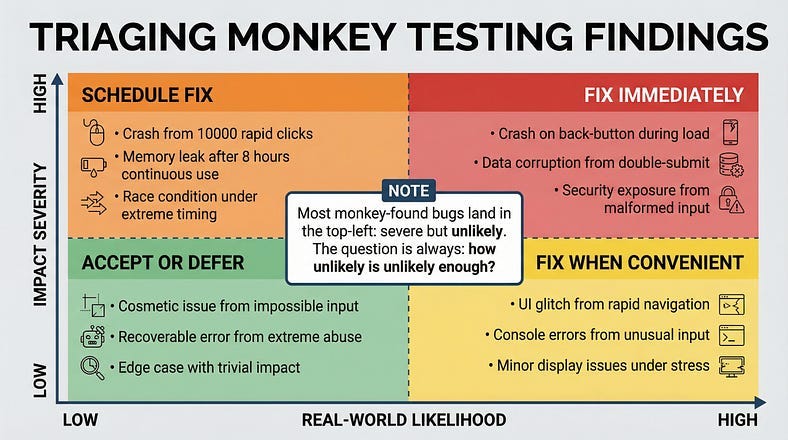
The Chaos That Builds Confidence
There’s something counterintuitive about monkey testing. It’s the most chaotic, least structured testing technique in your toolkit — and yet, passing it builds a specific kind of confidence that structured testing can’t provide.
Structured testing tells you: “The features we tested work as expected under the conditions we tested them.” That’s valuable but limited. It’s bounded by what you thought to test.
Monkey testing tells you something different: “We threw genuinely random, unpredictable chaos at this application and it didn’t break.” That statement covers territory that no amount of planning can reach, because it explicitly includes the interactions you didn’t think of.
This is why monkey testing belongs in every serious testing strategy — not as a primary technique, but as a resilience check that complements everything else. Your chartered sessions validate that features work. Your ad-hoc testing fills the gaps in your plans. And your monkey testing verifies that the application can survive the messy, unpredictable reality of actual usage at scale.
In an era of AI-generated code, this resilience check becomes even more important. AI tends to produce code that handles expected inputs elegantly but may have blind spots around unusual inputs, edge cases, and interaction patterns that fall outside its training data. Monkey testing — precisely because it operates outside any model of expected behavior — is perfectly positioned to discover these blind spots.
The toddler with your phone doesn’t care about your test plan. Neither do your users. Build software that survives both.
In our next article, we’ll explore Fuzz Testing Fundamentals — the close cousin of monkey testing that takes randomness and aims it with surgical precision at your application’s inputs. We compared the two briefly today, but fuzz testing deserves its own deep dive. We’ll examine how feeding deliberately malformed, unexpected, and boundary-pushing data into every input your system accepts reveals the security vulnerabilities, parsing failures, and crash-inducing edge cases that conventional testing consistently misses.
Remember: Monkey testing doesn’t find bugs through intelligence — it finds them through indifference. And software that can survive indifference can survive anything.