
Exhaustive Testing is Impossible
Why risk-based testing matters

Welcome back to NextGen QA! In our previous article, we explored why testing early and often saves time and money. Today, we’re tackling a principle that might seem counterintuitive at first: you cannot test everything.
This isn’t a failure of testing — it’s a mathematical and practical reality. Understanding why exhaustive testing is impossible, and learning how to make strategic decisions about what to test, is one of the most important skills for any tester.
Let’s explore why you can’t test everything, and more importantly, how to decide what you should test.

The Mathematics of Impossibility
Let’s start with a simple example to understand just how quickly testing scenarios explode into impossibility.
Example 1: A Simple Login Form
Consider a basic login form with two fields:
Username (allows 20 characters)
Password (allows 20 characters)
How many possible combinations exist?
If we only consider alphanumeric characters (26 letters + 26 uppercase + 10 digits = 62 characters):
Username possibilities: 62²⁰ = 704,423,425,546,998,022,968,330,264,616,370,176
Password possibilities: 62²⁰ = same astronomical number
Combined possibilities: essentially infinite for practical purposes
Time to test all combinations: If you could test one combination per second:
It would take approximately 22.3 quintillion years
For context, the universe is only 13.8 billion years old
And this is just TWO fields with basic characters!
Example 2: An E-Commerce Checkout
Now consider a realistic e-commerce checkout:
Product selection (thousands of products)
Quantity (1–999)
Shipping address (infinite variations)
Billing address (same or different)
Payment method (credit card, debit, PayPal, etc.)
Shipping method (standard, express, overnight)
Gift options (yes/no, with message)
Promotional codes (thousands possible)
Account states (logged in, guest, new user)
Browser types (Chrome, Firefox, Safari, Edge, etc.)
Device types (desktop, mobile, tablet)
Operating systems (Windows, Mac, iOS, Android, Linux)
Screen sizes (hundreds of possibilities)
Network conditions (fast, slow, intermittent)
Time zones and locales
Previous purchase history
Cart states (empty, full, modified)
Possible test combinations: Literally trillions upon trillions
Time available for testing: Probably 2–4 weeks
The math doesn’t work.
Example 3: Even “Simple” Software is Complex
Let’s look at something seemingly simple: a calculator app with basic operations (+, -, ×, ÷).
Factors to consider:
Number input combinations (infinite decimal numbers)
Operation combinations (sequences of operations)
Edge cases (divide by zero, very large numbers, very small numbers)
Scientific notation handling
Rounding behaviors
Memory functions (M+, M-, MR, MC)
Order of operations
Bracket handling
Display overflow
Input methods (keyboard, buttons, copy-paste)
Different locales (decimal comma vs period)
Result: Even a basic calculator has thousands of meaningful test scenarios

Why Exhaustive Testing is Impossible: The Reasons
It’s not just about math. There are multiple practical reasons why exhaustive testing can never be achieved.
1. Infinite Input Possibilities
Most software accepts some form of user input, and inputs are essentially infinite. Text fields can contain any character combination imaginable. Numeric fields can contain any number from negative infinity to positive infinity. Dates span infinite ranges across past, present, and future. File uploads can be any file type, any size, with any content. The possible variations are literally endless.
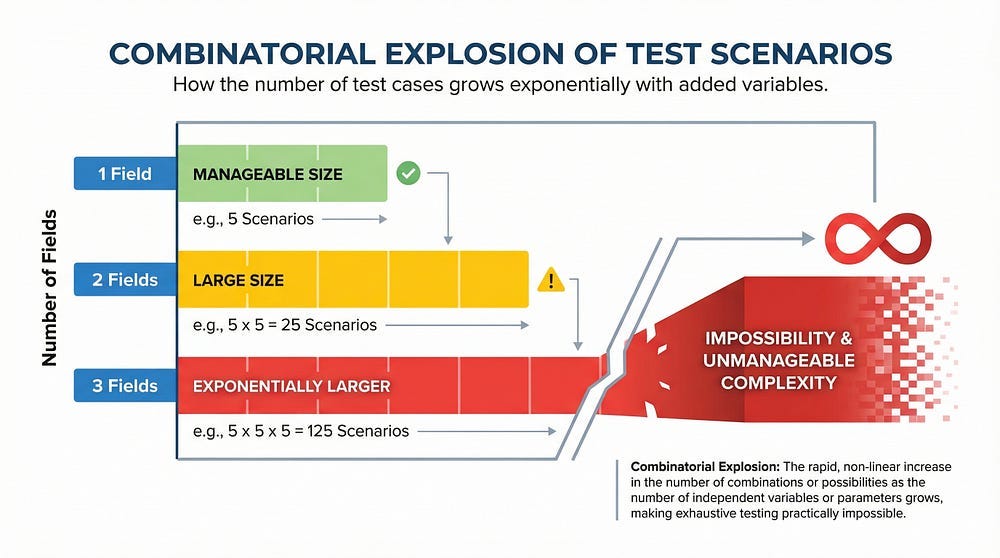
2. Combinatorial Explosion
When you combine multiple inputs or conditions, possibilities multiply exponentially rather than additively. Two yes/no options create four combinations. Five yes/no options jump to thirty-two combinations. Ten yes/no options explode to 1,024 combinations. Twenty yes/no options reach over one million combinations. Real applications have hundreds or thousands of decision points, creating combinations that dwarf these numbers.
3. Environmental Variables
Software doesn’t run in isolation — it runs in environments with countless variables. Operating system versions range from legacy systems to cutting-edge releases. Browser versions span years of development. Screen resolutions vary from tiny mobile screens to massive desktop displays. Network speeds fluctuate from lightning-fast fiber to crawling mobile connections. Hardware configurations differ in processing power, memory, and storage. Background processes consume unpredictable resources. Available memory changes moment to moment. Disk space varies by user. Time zones span the globe. Regional settings differ by country and culture. Each environmental combination creates a unique test scenario.
4. State Dependencies
Software behavior often depends on previous actions and current state. Whether a user is logged in or logged out changes everything. First-time users experience the application differently than returning users. An empty shopping cart behaves differently than a full one. Cleared cache produces different results than populated cache. Fresh installations work differently than upgraded versions. These state combinations multiply the test scenarios exponentially.
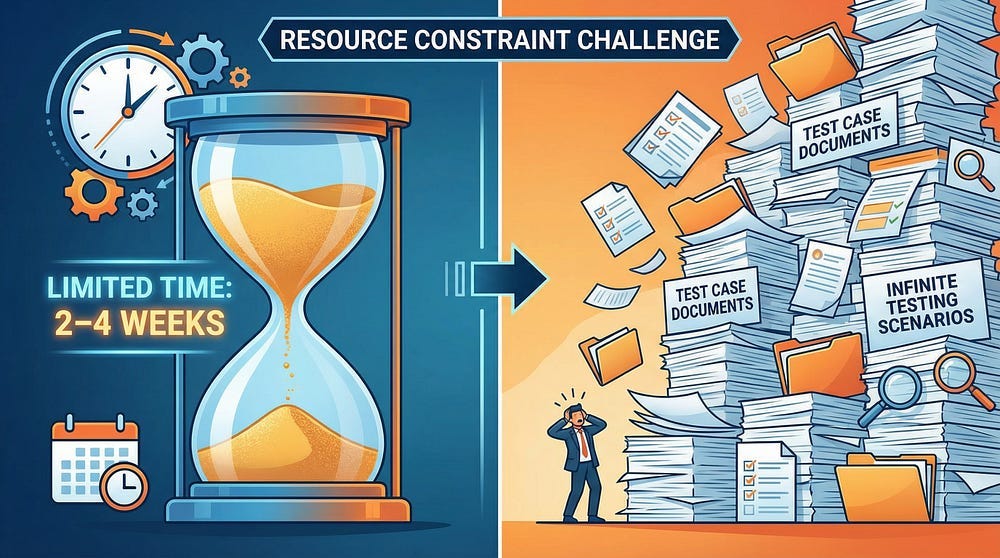
5. Time and Resource Constraints
Even if you could define all test scenarios, practical reality intervenes. Development cycles are measured in weeks, not years. Testing budgets are finite and often tight. Team sizes are limited by hiring and budget constraints. Market windows close as competitors release features. Customer expectations demand timely delivery. You have days or weeks to test what would take lifetimes to test exhaustively.
6. Software Changes Constantly
By the time you finished exhaustive testing, everything would have changed. Requirements evolve based on market feedback. New features get added to meet competitive pressure. Bug fixes alter behavior in unexpected ways. Technology stacks evolve with new frameworks and libraries. Market needs shift as customer preferences change. Exhaustive testing is a moving target that recedes faster than you can reach it.
The Shift in Mindset: From Exhaustive to Strategic
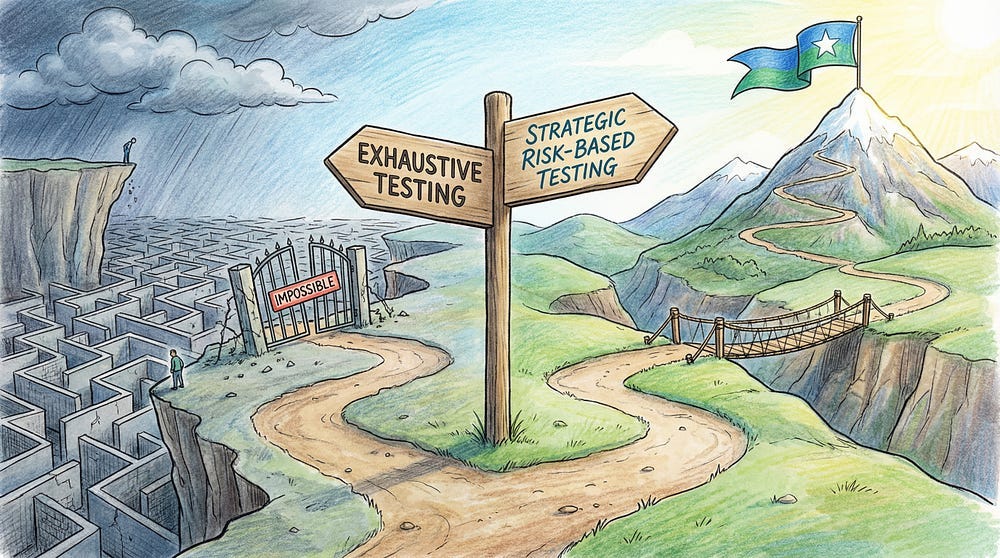
Once you accept that exhaustive testing is impossible, your thinking must shift:
Wrong Question: “How do I test everything?” Right Question: “How do I test the most important things effectively?”
Wrong Goal: “Find every possible bug” Right Goal: “Find the bugs that matter most, given constraints”
Wrong Approach: “Test everything equally” Right Approach: “Focus testing where risk is highest”
This shift from exhaustive to strategic testing is where professional testing expertise becomes valuable. Anyone can write test cases. Professional testers know which test cases matter.
Introduction to Risk-Based Testing
Risk-based testing is the practice of prioritizing testing efforts based on the risk associated with different features, functions, or areas of the application.
The Core Concept
Not all bugs are equally important. A critical payment processing bug is more important than a cosmetic misalignment. Risk-based testing acknowledges this and allocates testing resources accordingly.
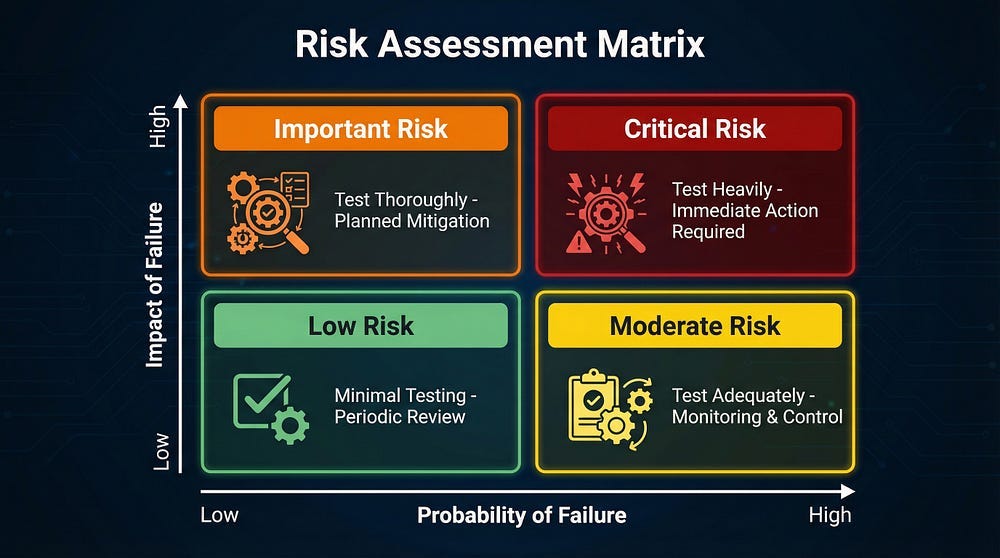
Risk = Probability of Failure × Impact of Failure
Understanding Probability of Failure
How likely is this feature to have defects? Several factors increase the probability that bugs will be present. Complex logic or algorithms tend to harbor more defects than simple code. Frequently changed code introduces new bugs with each modification. New technology or frameworks bring unknown issues because the team lacks experience with them. Integration points with external systems create communication failures and timing issues. Areas with historical defect clusters often continue to have problems because underlying complexity remains. Code written under time pressure sacrifices quality for speed. Features developed by less experienced team members may have design or implementation flaws. Newly added functionality hasn’t been battle-tested by users yet.
Conversely, some factors suggest lower probability of defects. Simple, straightforward logic leaves less room for errors. Stable, unchanged code has already been tested and refined. Mature, well-tested frameworks have had years to identify and fix issues. Isolated functionality avoids the complexity of interactions. Areas with clean defect history suggest good design and implementation. Well-tested reused components have proven themselves across multiple contexts.
Understanding Impact of Failure
If this feature fails, what happens? The consequences vary dramatically. Some failures have severe impacts. Financial transactions being affected means users lose money or can’t access funds. Security or privacy being compromised exposes sensitive data to attackers. Legal or regulatory compliance being violated brings fines, lawsuits, and government intervention. Data loss or corruption destroys information users depend on. System downtime or crashes prevent anyone from using the application. Safety risks to users in medical devices or automotive software can cause injury or death. Reputation damage erodes trust that took years to build. When a large user base is affected, the problem scales multiplically. If no workaround is available, users are completely blocked.
Other failures have minimal impact. Cosmetic issues annoy users but don’t prevent work. Non-critical features failing doesn’t block core functionality. When easy workarounds exist, users can accomplish their goals despite bugs. If only a small user subset is affected, the damage is contained. Systems that fail gracefully with clear error messages help users understand and cope. Features that are quick to fix if issues arise limit the duration of problems.
How to Apply Risk-Based Testing
Here’s a practical approach to implementing risk-based testing:
Step 1: Identify Risks
Work with stakeholders to identify potential risks through strategic questions. Ask what the most critical features are for users — the ones they depend on daily. Inquire about functionality that processes sensitive data like passwords, financial information, or health records. Identify which features are most complex from a technical perspective. Examine where bugs have been found in the past, as problem areas often remain problematic. Determine what areas are changing most frequently, since change introduces defects. Consider what would cause the most damage if it failed — not just technical damage, but business and reputation damage. Find out what features users rely on most through analytics or user research. Check whether there are regulatory or compliance requirements that make certain features legally critical.
The output of this step is a comprehensive list of features and areas with their associated risks clearly documented and shared with the team.
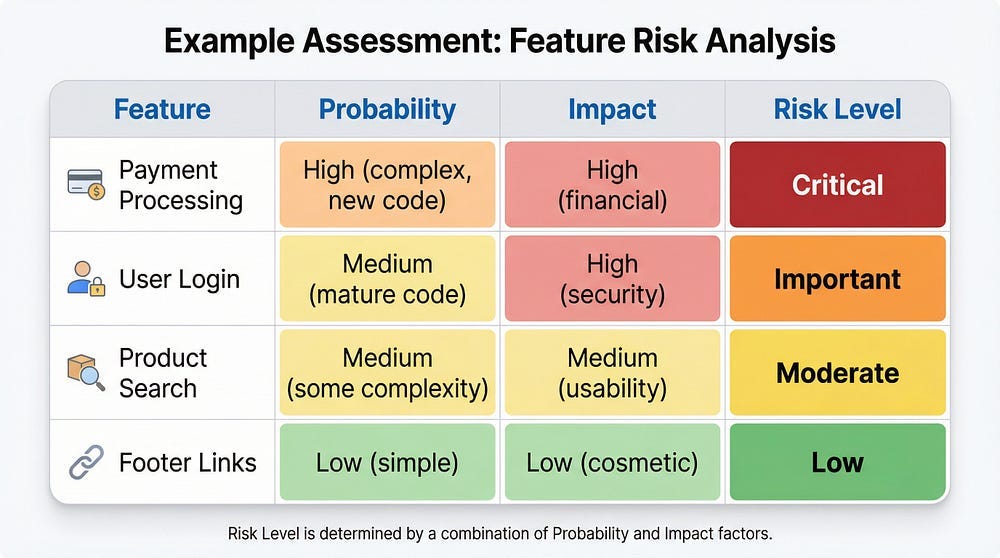
Step 2: Assess Risk Levels
For each identified risk, evaluate:
Probability: High, Medium, or Low
Impact: High, Medium, or Low
Combined Risk Level: Critical, Important, Moderate, or Low
Step 3: Allocate Testing Resources
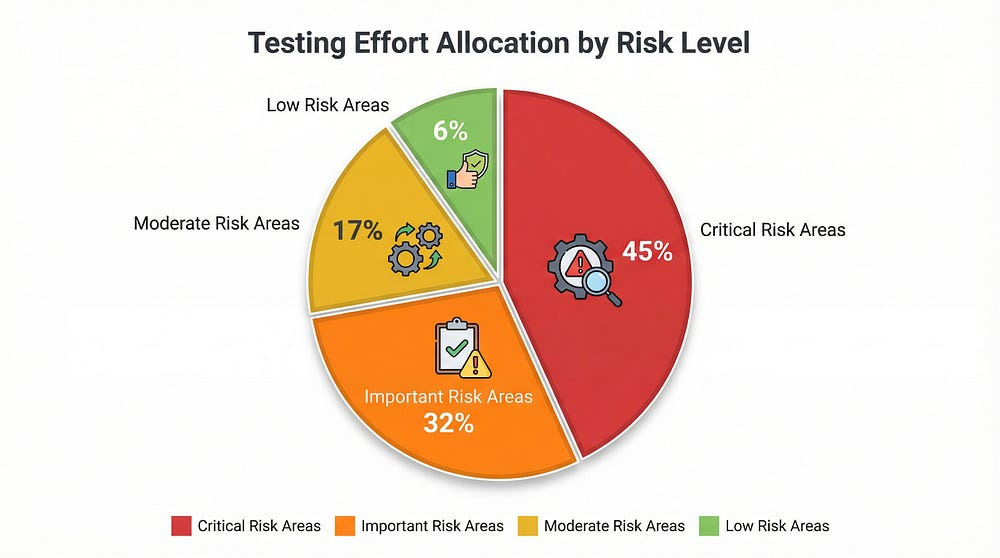
Distribute your testing time and effort based on risk:
Critical Risk (40–50% of testing effort):
Comprehensive test coverage
Multiple test techniques (functional, security, performance)
Automated regression tests
Manual exploratory testing
Edge cases and negative scenarios
Different environments and configurations
Load and stress testing if applicable
Security testing
Important Risk (30–35% of testing effort):
Thorough functional testing
Key scenarios and common paths
Some edge cases
Automated tests for core functionality
Basic security and performance checks
Moderate Risk (15–20% of testing effort):
Standard functional testing
Happy path scenarios
Basic negative testing
Automated smoke tests
Low Risk (5–10% of testing effort):
Basic smoke testing
Quick manual checks
May rely primarily on automated regression tests
May defer to later testing cycles
Step 4: Design Tests Based on Risk
For each risk level, choose appropriate test design techniques:
Critical Risk Areas — Use Multiple Techniques:
Equivalence partitioning
Boundary value analysis
Decision table testing
State transition testing
Error guessing
Exploratory testing
Use case testing
Negative testing
Important Risk Areas — Use Core Techniques:
Equivalence partitioning
Boundary value analysis
Key use cases
Basic negative testing
Moderate/Low Risk Areas — Use Basic Techniques:
Happy path testing
Basic equivalence classes
Smoke testing
Step 5: Monitor and Adjust
Risk assessment isn’t static. Continuously update your risk analysis:
Adjust based on:
Defects found (if an area has many bugs, increase risk assessment)
Code changes (new changes increase probability of failure)
Production issues (if something failed before, test it more)
Stakeholder feedback (business priorities may change)
Technology changes (new frameworks or integrations add risk)
Example: You initially assessed the search feature as “moderate risk.” During testing, you find 15 bugs. This suggests higher complexity than anticipated. Increase risk level to “important” and allocate more testing effort.
Real-World Risk-Based Testing Example
Let’s see risk-based testing in action:
Scenario: Online Banking Application
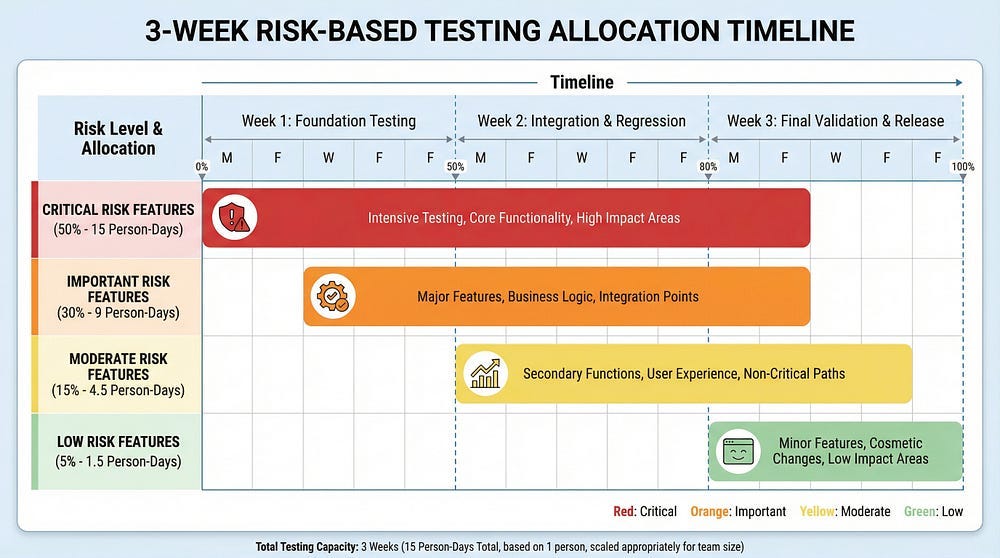
Testing Timeline: 3 weeks Team: 2 testers
Risk Assessment:
Critical Risk Features:
Fund transfers between accounts
Bill payments
External transfers (ACH)
User authentication and authorization
Password reset with security questions
Why critical: Financial transactions, security, regulatory compliance, high user impact
Testing allocation: 50% of time (7.5 days per tester = 15 person-days)
Important Risk Features:
Account balance display
Transaction history
Statement downloads
Profile updates
Beneficiary management
Why important: Core functionality, data accuracy, but not direct financial risk
Testing allocation: 30% of time (4.5 days per tester = 9 person-days)
Moderate Risk Features:
Currency converter
Branch locator
Financial calculators
Notifications settings
Help documentation
Why moderate: Useful but not critical, failures don’t cause financial loss
Testing allocation: 15% of time (2.25 days per tester = 4.5 person-days)
Low Risk Features:
Marketing banners
Color theme selection
Footer links
FAQ formatting
Social media links
Why low: Cosmetic or non-essential, minimal user impact
Testing allocation: 5% of time (0.75 days per tester = 1.5 person-days)
Testing Approach by Risk Level:
Critical Risk — Fund Transfers:
Test all amount boundaries (min, max, just below max)
Test insufficient funds scenarios
Test all account type combinations (checking to checking, checking to savings, etc.)
Test concurrent transfers
Test transfer cancellation
Test network interruption during transfer
Security testing (authorization, session handling)
Performance testing (multiple simultaneous transfers)
Different browsers and devices
Automated regression suite
Important Risk — Account Balance:
Verify balance accuracy after transactions
Test balance refresh
Test multiple currency displays
Test with pending transactions
Basic performance testing
Automated checks
Moderate Risk — Currency Converter:
Test major currency conversions
Test boundary values
Verify exchange rate accuracy
Basic functional testing
Smoke tests
Low Risk — Footer Links:
Verify links aren’t broken
Quick visual check
Included in automated smoke tests
Result:
With this strategic approach, testers provided comprehensive coverage of critical areas while ensuring basic functionality of lower-risk areas — all within the 3-week constraint. Without risk-based prioritization, they would have spread effort equally and provided insufficient coverage everywhere.
Common Pitfalls in Risk-Based Testing
Avoid these mistakes when implementing risk-based testing:
Pitfall 1: Ignoring Low-Risk Areas Completely
The mistake: “It’s low risk, so we won’t test it at all.”
The problem: Low risk doesn’t mean no risk. Even simple features can have bugs.
The solution: Allocate minimal but adequate testing. Use automated smoke tests. Do quick manual checks.
Pitfall 2: Static Risk Assessment
The mistake: Doing risk assessment once at the beginning and never updating it.
The problem: Risk levels change as you learn more about the system.
The solution: Revisit risk assessment weekly. Adjust based on defects found, code changes, and stakeholder feedback.
Pitfall 3: Only Considering Technical Risk
The mistake: Basing risk only on technical complexity.
The problem: Business impact matters more than technical complexity sometimes.
The solution: Balance technical risk with business risk. A simple feature used by millions is higher risk than a complex feature used by dozens.
Pitfall 4: Testing Without Clear Prioritization
The mistake: Saying “everything is high priority.”
The problem: If everything is high priority, nothing is.
The solution: Force prioritization. Not everything can be critical. Make hard choices about what matters most.
Pitfall 5: Not Communicating Risk Decisions
The mistake: Testers decide what to test without stakeholder input.
The problem: Testers might not understand business priorities correctly.
The solution: Collaborate with product owners, business analysts, and development leads on risk assessment. Make risk decisions transparent.
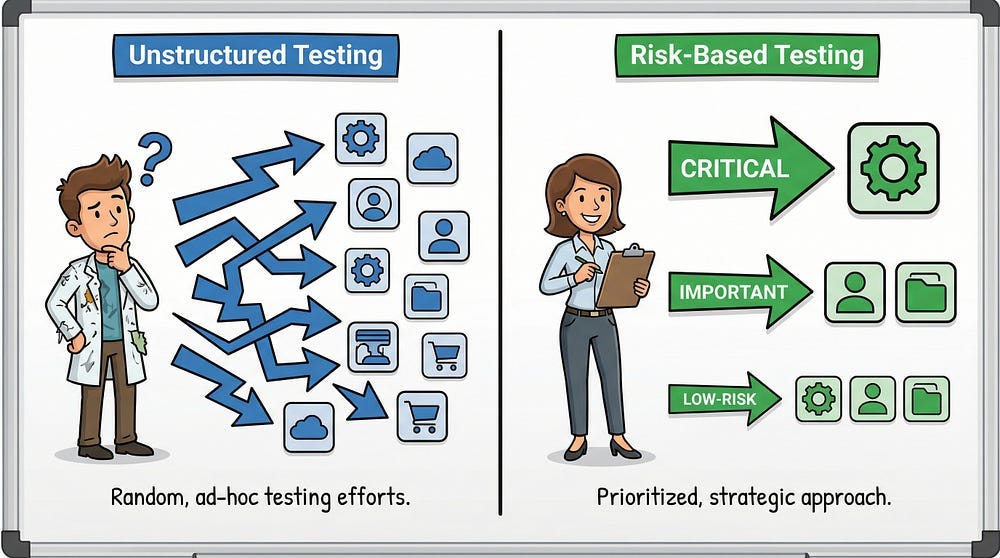
Pitfall 6: Confusing Risk-Based with Random
The mistake: “We can’t test everything, so we’ll just test whatever we have time for.”
The problem: This isn’t risk-based — it’s unstructured.
The solution: Risk-based testing is highly strategic. Every decision about what to test (and what not to test) should be intentional and justified.
Risk-Based Testing in Agile Environments
Risk-based testing fits naturally into Agile development:
Sprint Planning
During sprint planning, assess risk for each user story:
Which stories touch critical functionality?
Which have the most uncertainty or complexity?
Which have the highest business value?
Use risk assessment to:
Decide which stories need more testing effort
Identify stories that need testing expertise earlier
Determine appropriate definition of done
Daily Work
Within each sprint:
Test high-risk stories first
Allocate more time to risky features
Involve whole team in risk discussions
Adjust as you learn more
Retrospectives
Review whether risk assessment was accurate:
Did high-risk areas have more bugs?
Did we miss any risks?
Should we adjust our risk criteria?
Tools and Techniques for Risk Assessment
Here are practical tools to help with risk assessment:
Risk Matrix Template
Create a simple spreadsheet with columns:
Feature/Area
Probability (H/M/L)
Impact (H/M/L)
Combined Risk (Critical/Important/Moderate/Low)
Testing Effort Allocated (%)
Rationale
FMEA (Failure Mode and Effects Analysis)
More formal risk assessment technique:
List all possible failure modes
Rate severity (1–10)
Rate probability (1–10)
Rate detection difficulty (1–10)
Calculate Risk Priority Number (RPN) = Severity × Probability × Detection
Prioritize testing based on RPN
Risk Poker
Team-based risk assessment:
Similar to planning poker
Team members estimate risk level independently
Discuss discrepancies
Reach consensus
Reduces individual bias
Checklists
Develop risk assessment checklists:
Does this feature handle money?
Does it process personal data?
Is it new or changed code?
Does it integrate with external systems?
What’s the historical defect rate for this area?
Answer these questions to systematically assess risk.
AI and Risk-Based Testing
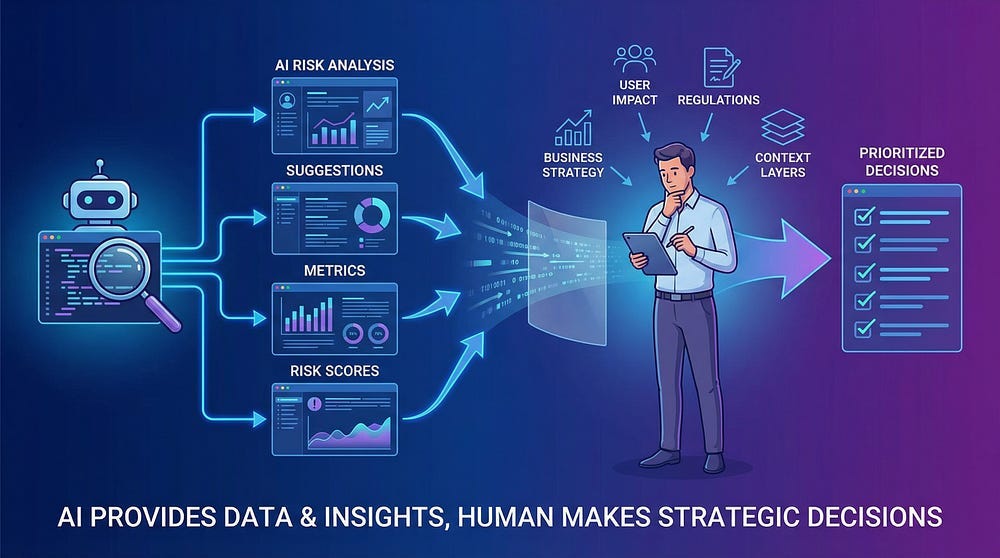
AI can assist with risk-based testing, but with important caveats:
How AI Can Help
Pattern Recognition:
AI can analyze historical defect data to identify high-risk areas
Predict where bugs are likely based on code complexity metrics
Identify code changes that historically correlate with defects
Test Prioritization:
AI can suggest which tests to run based on code changes
Recommend test execution order based on risk
Identify redundant or low-value tests
Risk Scoring:
Automated calculation of risk scores based on multiple factors
Real-time risk updates as code changes
Visualize risk across the codebase
AI’s Limitations in Risk Assessment
AI cannot:
Understand business context and priorities
Assess impact on user experience
Evaluate regulatory or legal implications
Apply common sense about real-world usage
Balance technical risk with business risk
Make strategic trade-off decisions
Your role:
Provide business context AI lacks
Validate AI risk assessments against reality
Make final decisions about test prioritization
Override AI when your expertise says otherwise
Consider factors AI doesn’t measure (reputation, strategy, user trust)
Trust but verify: Use AI to identify potential risks faster, but apply your expertise to assess what actually matters.
Documenting and Communicating Risk Decisions
Transparency in risk-based testing is crucial:
What to Document
Risk Register:
List of identified risks
Risk ratings (probability, impact, combined)
Testing approach for each risk level
Rationale for decisions
Date of assessment
Who assessed the risk
Test Coverage Map:
Visual representation of what’s being tested at what depth
Clearly show areas with comprehensive testing
Clearly show areas with minimal testing
Highlight any untested areas (with justification)
Testing Strategy Document:
Overall risk-based approach
Criteria for risk assessment
Resource allocation by risk level
Review and update frequency
How to Communicate Risk
To Stakeholders: “We’re focusing 50% of testing effort on payment processing because it’s high complexity, handles money, and has regulatory requirements. The footer links will receive minimal testing — automated smoke tests only — because they’re low complexity and low impact. Here’s our complete risk assessment…”
To Development Team: “These five user stories are high risk and need careful attention to testability. Can we review the design together? These three stories are lower risk — standard testing will be sufficient.”
To Management: “Given our 2-week testing window, here’s where we’re allocating resources and why. These are the areas we’re testing comprehensively, these moderately, and these minimally. Here are the conscious trade-offs we’re making…”
Key principle: Make risk decisions visible and justified, not hidden or arbitrary.
When Exhaustive Testing Might Be Attempted
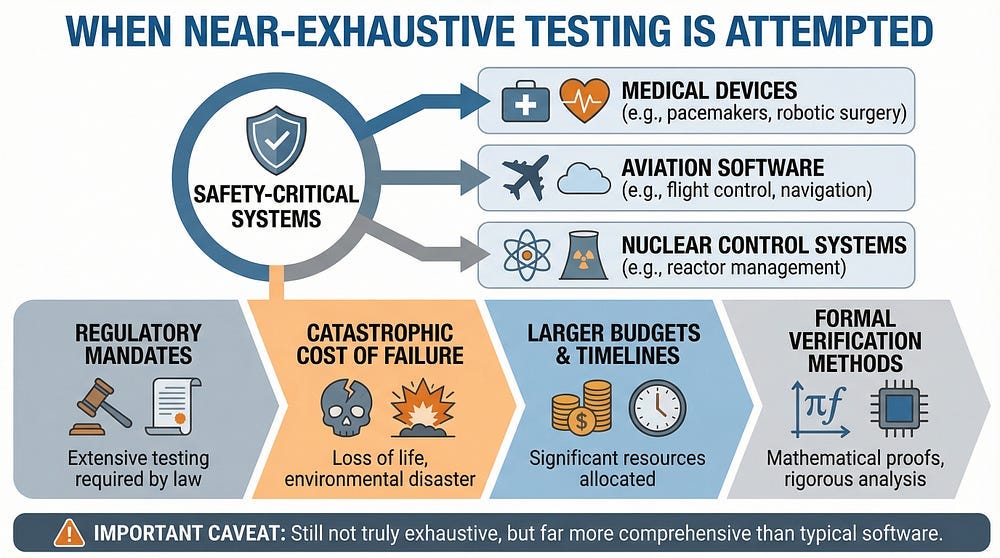
There are rare scenarios where near-exhaustive testing is appropriate:
Safety-Critical Systems
For medical devices, aviation software, or nuclear control systems:
Regulatory requirements may mandate extensive testing
The cost of failure is catastrophic
Testing budgets and timelines are much larger
Formal verification methods are used
Still not truly exhaustive, but far more comprehensive than typical software
Simple, Critical Algorithms
For specific algorithms that are:
Mathematically definable
Have limited input domains
Are absolutely critical
Can be formally verified
Example: An encryption algorithm with specific input constraints might be tested exhaustively within those constraints.
Legacy Code with Complete Test Suites
When maintaining mature software:
If comprehensive test suites already exist
And you’re making minimal changes
You might execute the complete existing suite
But even here: You’re not testing all possible scenarios — you’re executing all existing tests, which themselves are a subset of possibilities.
Reality: For 99% of software testing situations, risk-based approaches are necessary and appropriate.
Your Action Steps
This week, practice risk-based thinking:
Assess something you’re testing: Take a current project and create a risk matrix. List features, assess probability and impact, calculate combined risk. Does your current testing allocation match the risk levels?
Identify your constraints: Write down your actual testing constraints (time, resources, environment limitations). Be honest about what’s actually achievable.
Calculate an impossibility: Take a feature you’re testing. Calculate how many possible test combinations exist. Compare to your available testing time. Let the math sink in.
Review past bugs: Look at production bugs from the last 6 months. Were they in high-risk areas? Should those areas have been higher risk in your assessment? What can you learn?
Have a risk conversation: Discuss risk-based testing with your team. Get stakeholder input on what they consider high-impact. Make risk assessment collaborative, not isolated.
Moving Forward
Accepting that exhaustive testing is impossible isn’t giving up — it’s growing up as a tester. Professional testing is about making smart, strategic decisions under constraints.
Risk-based testing allows you to:
Provide appropriate coverage within real-world constraints
Focus effort where it matters most
Make conscious, justified trade-offs
Communicate clearly about what’s tested and what’s not
Deliver quality software on time and within budget
The question is never “How do I test everything?” It’s “How do I test the right things effectively?”
In our next article, we’ll explore Defect Clustering — the phenomenon where bugs tend to concentrate in specific areas of the code. Understanding defect clustering helps you refine your risk assessment and target testing effort even more effectively. It connects directly to today’s topic: when you can’t test everything, knowing where bugs hide helps you test smarter.
Remember: Testing everything is impossible. Testing strategically is essential.
This breakdown of risk-based testing is spot-on, the mathematics of impossibility section really hammers home why exhaustive testing is a fantasy not a goal. We implemented a similar 40/30/15/5 resource allocation model last quarter after spending way too much time on low-impact features, and it cut our testing cycle by almost 30% while actualy improving our critical path coverage. The FMEA technique mention is underrated, dunno why more teams dont use it for initail risk assessment instead of just gut feeling.