
Boundary Value Analysis: Finding Bugs at the Edges
The $0.01 That Cost a Company $1.2 Million

The e-commerce platform had a simple free shipping rule: orders of $100 or more ship free. The development team implemented it, the QA team tested it, and everyone was satisfied. They’d verified that a $50 order charged shipping and a $150 order didn’t. The feature shipped to production on a Thursday.
By Monday morning, the finance team was in a panic. Over the weekend, 14,000 orders totaling $100.00 exactly had been charged $5.99 shipping. Customers were furious. Social media was on fire. The company had to issue refunds, offer appeasement credits, and deal with a customer service backlog that took two weeks to clear. Total cost: roughly $1.2 million in refunds, credits, lost goodwill, and overtime.
The bug? The developer had written if (orderTotal > 100) instead of if (orderTotal >= 100). Greater than, not greater than or equal to. An order of $100.01 got free shipping. An order of exactly $100.00 did not. The difference between > and >= — a single character in a single line of code.
The QA team had tested the right partitions. They’d checked a value clearly below the threshold and a value clearly above it. Equivalence partitioning would call that correct — $50 and $150 are valid representatives of their respective partitions. But they’d never tested the boundary itself. They never tried $100.00 exactly. Or $99.99. Or $100.01. The three values that would have instantly revealed the defect.
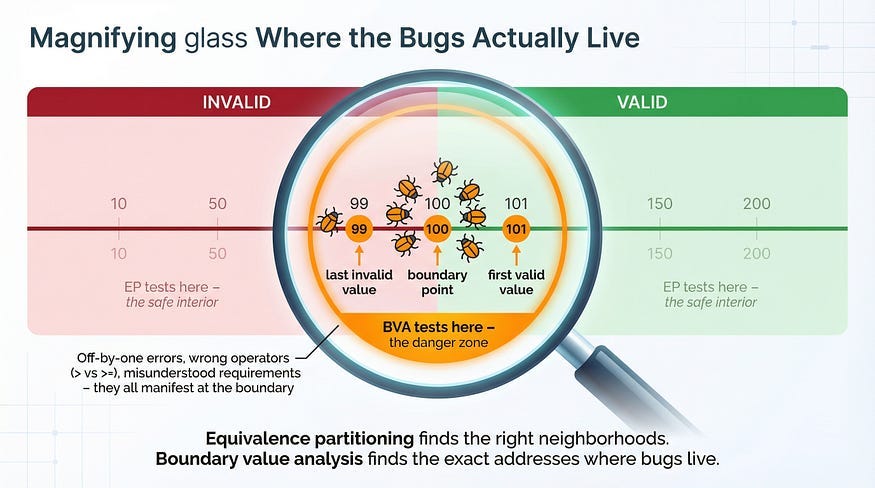
This is why boundary value analysis exists. Bugs don’t distribute evenly across the input space. They cluster at the edges — at the exact points where system behavior changes from one partition to another. The boundaries between “charge shipping” and “free shipping,” between “valid” and “invalid,” between “accepted” and “rejected.” These transition points are where developers write the conditional logic that determines which path the code takes, and conditional logic is where off-by-one errors, incorrect operators, and misunderstood requirements live.
In our previous article, equivalence partitioning taught us to divide inputs into groups that behave the same and test one value from each group’s interior. Boundary value analysis completes the picture by telling us exactly where the most dangerous values are: right at the edges of those partitions.
What Boundary Value Analysis Is
Boundary value analysis (BVA) is a test design technique that focuses testing on the values at and around the edges of equivalence partitions. Instead of testing a value from the comfortable middle of a partition, BVA tests the minimum, maximum, and the values immediately adjacent to partition boundaries.
The reasoning is statistical and practical. Studies of software defects consistently show that errors are far more likely at boundary conditions than at interior values. This makes intuitive sense when you think about how code is written. A developer implementing the age validation 18–120 writes something like:
if (age >= 18 && age <= 120) {
    accept();
} else {
    reject();
}
The logic that determines behavior lives in those comparison operators: >= and <=. If the developer writes > instead of >=, every value in the interior of the valid partition (19, 20, 50, 100) still works correctly. The bug only manifests at the boundary — age 18 specifically. Testing age 65 would never find this defect. Testing age 18 finds it instantly.
This is the core principle: boundary values have disproportionate defect-detection power compared to interior values. A single test at a boundary is worth more than dozens of tests in the partition’s interior.
The Boundary Values: Which Ones to Test
For any boundary between two partitions, BVA identifies specific values that must be tested. The exact set depends on which variation of BVA you’re using.
Two-Value BVA (Standard)
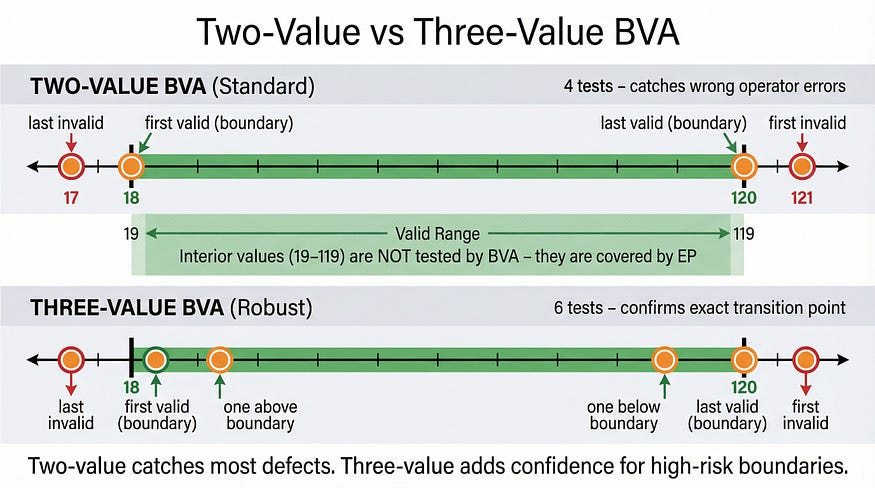
The most common approach tests two values at each boundary: the value on the boundary itself and the value immediately adjacent on the other side.
For the age field (valid range 18–120), the boundaries are at 18 (lower) and 120 (upper):
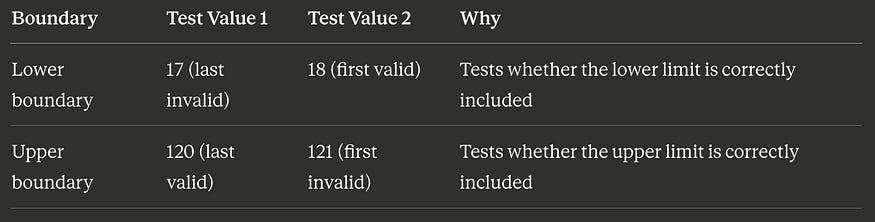
Four test values total. These four values detect the most common boundary defects: using > instead of >=, using < instead of <=, being off by one in either direction.
Three-Value BVA (Robust)
The more thorough approach tests three values at each boundary: the boundary itself, one value below it, and one value above it.

Six test values total. The extra values (19 and 119) provide additional confidence that the transition between partitions happens at exactly the right point — not one value early or late.
Which Approach to Use?
Two-value BVA is sufficient for most situations and is the industry standard. Three-value BVA is worth the extra tests for high-risk boundaries — financial thresholds, security-related limits, regulatory compliance values — where the cost of a boundary defect is high.
BVA + EP: The Complete Test Suite
Boundary value analysis doesn’t replace equivalence partitioning — it completes it. The two techniques work together to provide comprehensive coverage with minimal redundancy.
Let’s return to the shipping calculator from our equivalence partitioning article and build the complete test suite. Here are the business rules again:
Orders under $25.00: shipping $8.99
Orders $25.00 — $49.99: shipping $5.99
Orders $50.00 — $99.99: shipping $2.99
Orders $100.00+: free shipping
Orders $0.00 or less: invalid
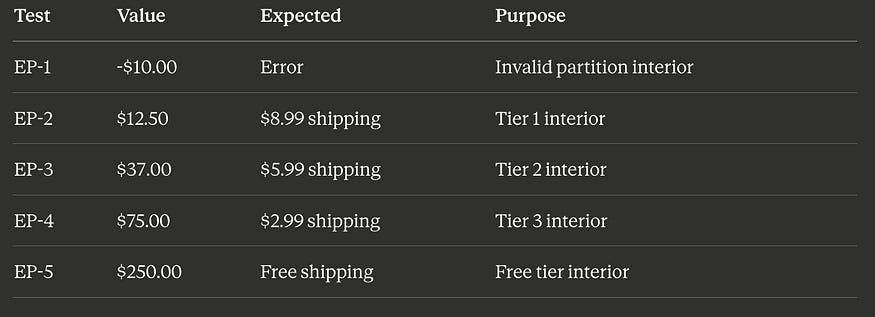
EP Tests (from the previous article)
We already have five tests from equivalence partitioning, each using a value from the interior of a partition:
BVA Tests (new)
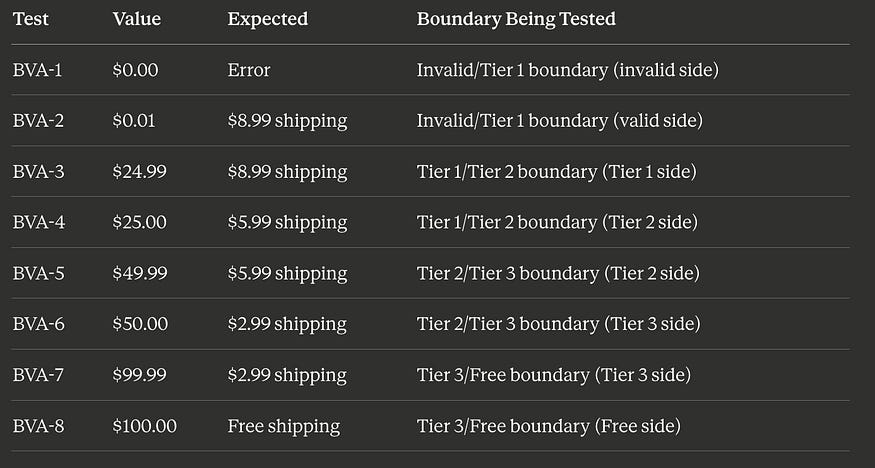
Now we add boundary tests. This system has four boundaries where behavior changes: at $0.00/$0.01, at $24.99/$25.00, at $49.99/$50.00, and at $99.99/$100.00. Using two-value BVA:
The Combined Suite
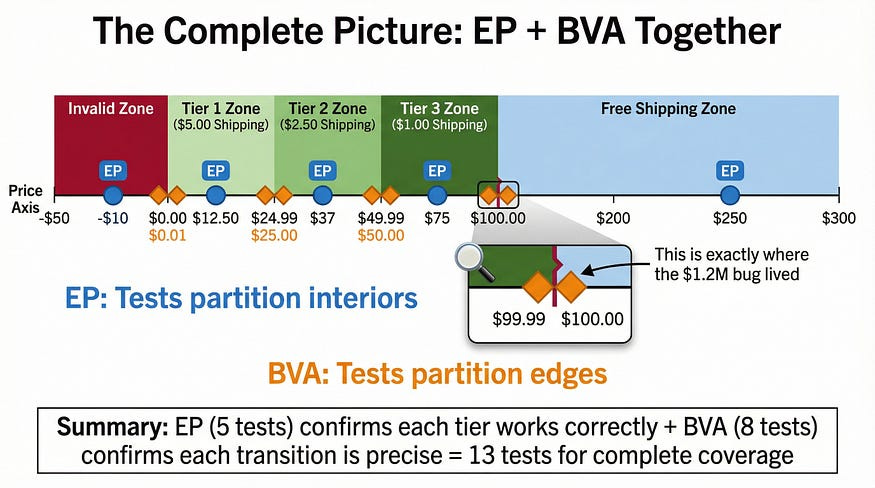
Thirteen total tests: 5 from EP + 8 from BVA. This suite catches:
Any partition where the core logic is entirely wrong (EP tests)
Any boundary where the transition point is off by one cent (BVA tests)
Any boundary where the wrong comparison operator was used (BVA tests)
Any boundary where the developer’s understanding of “up to $49.99” vs “under $50.00” differs from the requirement (BVA tests)
Compare this to the opening story: if that team had applied BVA to their free shipping boundary, they’d have tested $99.99, $100.00, and $100.01. The > vs >= bug would have been caught in minutes, not discovered by 14,000 angry customers.
A Complete Walkthrough: The Password Strength Validator
Let’s work through a fresh example end-to-end, applying both EP and BVA together the way you would in real testing.
A password field has these rules:
Minimum 8 characters, maximum 64 characters
Must contain at least one uppercase letter
Must contain at least one lowercase letter
Must contain at least one number
Must contain at least one special character (!@#$%^&*)
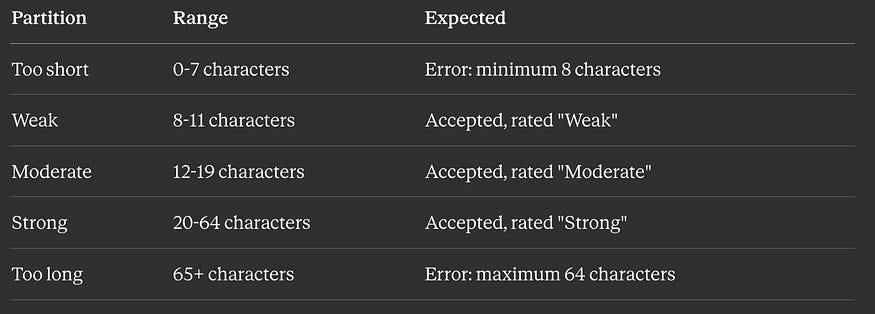
Strength rating: 8–11 chars = “Weak,” 12–19 chars = “Moderate,” 20–64 chars = “Strong”
Step 1: Identify the Partitions (EP)
Length partitions:
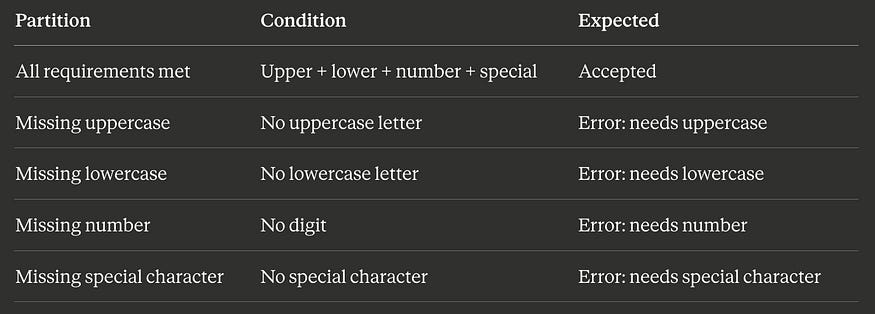
Character composition partitions:
Step 2: Select EP Interior Values
PartitionTest Value (length)Example PasswordToo short4 charsAb1!Weak10 charsAbcde12!fgModerate15 charsAbcdefgh12!jklmStrong40 charsAbcdefghijklmnop12!rstuvwxyz1234567890AbToo long70 chars(70-character string with valid composition)
Step 3: Identify Boundaries and Select BVA Values
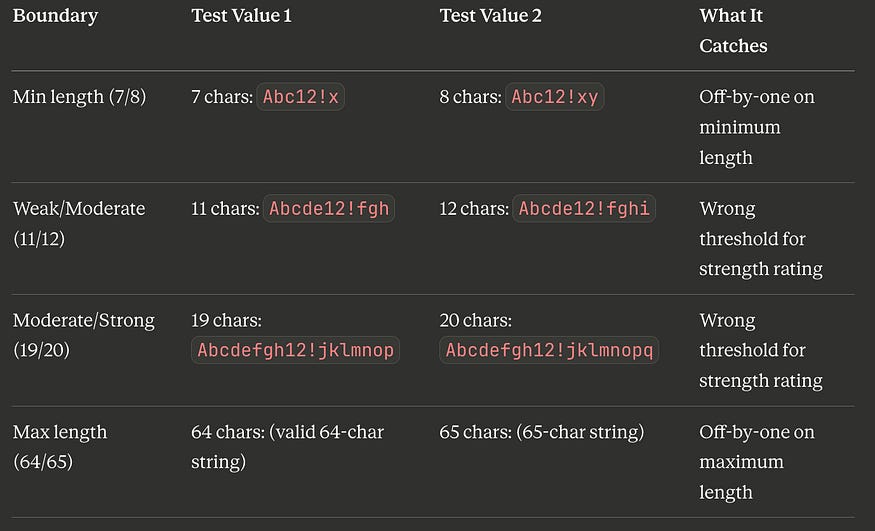
The length boundaries are at 7/8, 11/12, 19/20, and 64/65. Using two-value BVA:
Step 4: Build the Combined Test Suite
PASSWORD VALIDATOR TEST SUITE
==============================

EP TESTS (interior values):
  EP-1: 4 chars “Ab1!” → Error: minimum 8 characters
  EP-2: 10 chars (valid composition) → Accepted, “Weak”
  EP-3: 15 chars (valid composition) → Accepted, “Moderate”
  EP-4: 40 chars (valid composition) → Accepted, “Strong”
  EP-5: 70 chars (valid composition) → Error: maximum 64 characters
  EP-6: 10 chars, no uppercase → Error: needs uppercase
  EP-7: 10 chars, no lowercase → Error: needs lowercase
  EP-8: 10 chars, no number → Error: needs number
  EP-9: 10 chars, no special char → Error: needs special character
BVA TESTS (boundary values):
  BVA-1: 7 chars “Abc12!x” → Error: minimum 8 characters
  BVA-2: 8 chars “Abc12!xy” → Accepted, “Weak”
  BVA-3: 11 chars (valid) → Accepted, “Weak”
  BVA-4: 12 chars (valid) → Accepted, “Moderate”
  BVA-5: 19 chars (valid) → Accepted, “Moderate”
  BVA-6: 20 chars (valid) → Accepted, “Strong”
  BVA-7: 64 chars (valid) → Accepted, “Strong”
  BVA-8: 65 chars (valid) → Error: maximum 64 characters

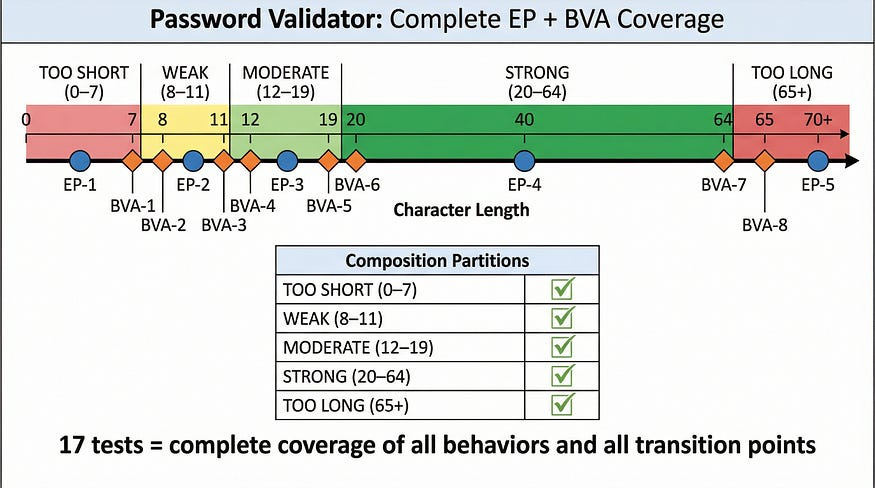
TOTAL: 17 test cases (9 EP + 8 BVA)
Seventeen tests cover every partition and every boundary of a moderately complex password validator. Without these techniques, a tester might write 30 tests and still miss the boundary between “Moderate” and “Strong” ratings — or they might write 10 tests and coincidentally cover some boundaries but miss entire partitions.
Why Boundaries Are Bug Magnets: The Technical Reality
It’s worth understanding why boundaries attract defects at a technical level, because this understanding helps you identify which boundaries deserve the most testing attention.
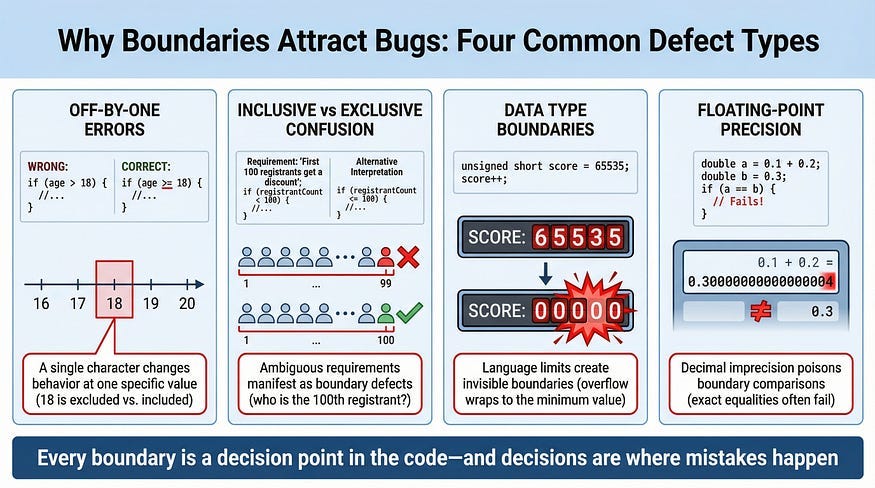
Off-by-One Errors
The most common boundary defect. The developer means “18 or older” but writes age > 18 (which excludes 18) instead of age >= 18 (which includes it). These errors are pervasive because the difference between >, >=, <, and <= is subtle, easy to mix up, and often not caught by code review.
Real example: A parking garage charges a flat rate for stays under 2 hours and an hourly rate for longer stays. The developer writes if (duration < 2) for the flat rate. A customer who parks for exactly 2.0 hours is charged the hourly rate, not the flat rate. The spec said “under 2 hours” — but did it mean “less than 2 hours” or “up to 2 hours”? The ambiguity lives at the boundary, and only testing the boundary reveals whether the implementation matches the intent.
Inclusive vs. Exclusive Range Confusion
Requirements often use ambiguous language: “between 1 and 10,” “from 5 to 15,” “up to 100.” Does “between 1 and 10” include 1 and 10, or just the values strictly between them? Does “up to 100” include 100? Different developers interpret this differently, and without boundary testing, the inconsistency hides until production.
Real example: A conference registration system offers “early bird pricing for the first 100 registrants.” Developer A implements the counter as if (count < 100) — so registrant #100 pays full price. Developer B on the same team, working on the confirmation email, checks if (count <= 100) — so registrant #100 gets an email confirming early bird pricing but is actually charged full price. The two developers had different interpretations of “first 100,” and only testing with registrant #100 specifically would reveal the mismatch.
Data Type Boundaries
Programming languages have built-in boundaries that developers sometimes forget about. A 32-bit integer can hold values up to 2,147,483,647. An 8-bit unsigned integer caps at 255. A JavaScript number loses precision above 2⁵³. These aren’t business logic boundaries — they’re technical boundaries that cause silent, dangerous failures when exceeded.
Real example: A game’s score counter used a 16-bit integer, capping at 65,535. When a high-scoring player exceeded that value, the counter silently wrapped around to zero. The player lost all their progress. The score worked perfectly for every value from 0 to 65,534 — only the boundary at 65,535 revealed the catastrophic overflow.
Floating-Point Precision Boundaries
Currency calculations, percentage computations, and any arithmetic involving decimals are boundary-prone because floating-point representation can’t express all decimal values precisely. The classic example: in many programming languages, 0.1 + 0.2 equals 0.30000000000000004, not 0.3. When boundary comparisons involve floating-point values, this imprecision can cause the comparison to go the wrong way.
Real example: A tax calculation applied a 7.5% rate. For an item priced at $9.99, the tax was calculated as $0.74925, which was rounded to $0.75 for display. But the boundary check for a tax exemption threshold compared the unrounded value, and $0.74925 fell just below the threshold while the displayed $0.75 would have been above it. The customer saw a tax charge but the system classified it as exempt — creating a ledger mismatch that compounded over thousands of transactions.
BVA for Non-Numeric Inputs
Boundaries aren’t just about numbers. Any input where the system’s behavior changes at a defined point has boundaries that should be tested.
String Length Boundaries
A field that accepts 1–255 characters has boundaries at 0/1 (empty vs. minimum valid) and 255/256 (maximum valid vs. too long).
BVA tests for a 1-255 character field:
  0 chars (empty) → Expected: error
  1 char → Expected: accepted (minimum)
  255 chars → Expected: accepted (maximum)
  256 chars → Expected: error (too long)
Practical tip: When testing maximum-length strings, pay attention to how the system counts. Does it count bytes or characters? A string of 255 emoji characters might be 255 characters but 1,020 bytes in UTF-8. If the system’s length validation counts bytes but the spec says “characters,” the boundary is different than expected — and that mismatch is a defect.
Date Boundaries
Date inputs often have boundaries defined by business rules, calendar transitions, or system limits.
Event booking (1–90 days in advance):
Today → Error: must be at least 1 day in advance
  Tomorrow → Accepted (minimum advance booking)
  90 days from today → Accepted (maximum advance booking)
  91 days from today → Error: maximum 90 days in advance
Calendar boundaries that developers regularly get wrong:
January 31 → Valid (last day of 31-day month)
  February 28 (non-leap year) → Valid
  February 29 (non-leap year) → Invalid (does the system handle this?)
  February 29 (leap year) → Valid (does the system handle this?)
  December 31 → Year-end boundary (timezone-sensitive!)
  December 31 23:59:59 → End-of-day boundary
  January 1 00:00:00 → Start-of-year boundary
Real example: A subscription billing system charged on the last day of each month. It worked correctly for months with 31 days and months with 30 days. But in February, the system tried to charge on February 30, a date that doesn’t exist. The payment failed silently, and customers got a free month. The boundary between “last day of the month” and “the 30th” was never tested.
Enumerated Value Boundaries
For inputs with a finite set of valid values, the boundaries are between “a value in the set” and “a value not in the set.”
User role dropdown (Admin, Editor, Viewer):
“Admin” → Expected: admin permissions granted
  “Editor” → Expected: editor permissions granted
  “Viewer” → Expected: viewer permissions granted
  “admin” (lowercase) → Boundary: is matching case-sensitive?
  “SuperAdmin” → Boundary: non-existent role
  “” (empty) → Boundary: no role selected
  “Admin “ (trailing space) → Boundary: whitespace handling
The “boundaries” for enumerations are the values that are almost valid — misspellings, case variations, extra whitespace, and values adjacent in meaning but not in the valid set.
BVA for Output Boundaries
Most testers apply BVA to inputs, but outputs have boundaries too. When the system’s output changes based on certain conditions, those transition points are worth testing.
Example: A grading system:
Score RangeGradeLetter90–100ADistinction80–89BMerit70–79CPass60–69DMarginal pass0–59FFail
Input BVA would test scores at the boundaries: 59, 60, 69, 70, 79, 80, 89, 90. But output BVA asks: are the output values themselves correct at those boundaries? Does a score of 90 display exactly “A” and “Distinction”? Or does it accidentally show “B” because the lookup table has the wrong boundary?
Real example: A health app calculated BMI and displayed risk categories. The BMI formula was correct, and the category boundaries were correctly implemented. But the display logic used a different set of boundary values than the calculation logic — BMI 24.9 was categorized as “Normal” but displayed in the “Overweight” color. The output boundary didn’t match the calculation boundary, and the visual inconsistency alarmed users into unnecessary doctor visits.
Common BVA Mistakes
Testing Boundaries Without EP First
BVA tests the edges of partitions — but if you haven’t identified the partitions correctly, you’ll test the wrong edges. Always start with equivalence partitioning to identify the partitions and their boundaries, then apply BVA to those boundaries. Jumping straight to boundary testing without understanding the partition structure leads to missing boundaries entirely.
Forgetting the “Just Inside” Values
Some testers only test the boundary value itself ($100.00) without testing the adjacent values ($99.99 and $100.01). The power of BVA comes from testing on both sides of a boundary. The boundary value alone doesn’t tell you whether the transition is in the right place — you need values on each side to confirm which partition the boundary belongs to.
Ignoring Implicit Boundaries
Not all boundaries are stated in the requirements. Technical limits (integer maximums, string length limits, array size limits), temporal boundaries (end of day, end of month, end of year, daylight saving transitions), and platform boundaries (screen resolutions, memory limits) are all real boundaries that the system must handle, even when the spec doesn’t mention them.
Treating All Boundaries Equally
Not every boundary carries the same risk. The boundary between “free shipping” and “paid shipping” directly affects revenue. The boundary between a “Weak” and “Moderate” password rating is cosmetic. Prioritize your BVA testing by the business impact of getting the boundary wrong.
BVA and AI-Generated Code: Where It Pays Off Most
AI code generation tools are particularly prone to boundary errors for a subtle reason: they generate code that looks correct based on pattern matching, but the choice between > and >=, between < length and <= length, between “up to” and “including” — these are semantic decisions that require understanding the business intent, not just the code pattern.
When you’re verifying AI-generated validation, BVA should be your first technique after reading the code. Identify every conditional comparison the AI wrote and test both sides of each one. This takes minutes and catches the exact category of defect that AI tools introduce most frequently.
Example: You ask an AI to generate a function that applies a 10% discount to orders over $50. The AI produces:
python
def calculate_discount(order_total):
    if order_total > 50:
        return order_total * 0.90
    return order_total
BVA immediately asks: what happens at $50.00 exactly? The code uses >, so $50.00 gets no discount. Is that correct? The requirement said “over $50” — which could mean “more than $50” (the AI’s interpretation) or “from $50 and above” (equally valid). Without testing $49.99, $50.00, and $50.01, you’d never know the AI’s interpretation matched the business intent.
The Edge Is Where It Matters
Every partition has an interior and an edge. The interior is where software typically works fine — the values are unremarkable, the code paths are well-traveled, and the logic is straightforward. The edge is where the logic makes decisions, where one behavior transitions to another, where a single character in the source code determines whether a value is accepted or rejected.
Equivalence partitioning finds the neighborhoods where bugs might live. Boundary value analysis walks up to the exact door and knocks. Together, they form the foundation of systematic test design — a foundation that every technique we cover from here forward will build upon.
The $0.01 difference between > and >= cost a company $1.2 million. The fifteen minutes it would have taken to test that boundary would have cost nothing. That’s the return on investment of boundary value analysis: a handful of carefully chosen test values that catch the defects with the highest impact-to-probability ratio in all of software testing.
In our next article, we’ll explore Decision Table Testing — the technique for handling complex business logic where multiple inputs combine to determine the outcome. When simple partition boundaries aren’t enough because the behavior depends on combinations of conditions, decision tables give you a systematic way to ensure every combination is covered.
Remember: Bugs don’t hide in the middle. They hide at the edges. Boundary value analysis is how you find them before your users do.